AI Christmas Photoshoot Prompt: Free Ideas for Family, Couples, and Pets
Copy-and-paste AI Christmas photoshoot prompts for families, couples, and pets, plus a simple prompt formula, lighting words that add realism, a step-by-step Seedream 4.5 workflow, and fixes for the most common holiday portrait mistakes.
Every December the same thing happens. You want one great holiday photo, the kids refuse to sit still, the dog eats an ornament, and the light in your living room turns everyone orange. An AI Christmas photoshoot prompt skips all of that. You type a few lines, and a few seconds later you have a portrait that looks like a professional shot on Kodak Portra 400, with real fabric texture, soft fairy-light bokeh, and faces that actually look relaxed.
This article gives you free, copy-ready prompts for families, couples, and pets. Every example below was written to produce photorealistic results, and the images you see are the kind of output you can expect. You will also get a simple formula for writing your own prompts, a table of lighting words that work, a short tutorial for Seedream 4.5, and fixes for the problems that ruin most holiday renders.
Why AI Christmas Portraits Work
A traditional Christmas shoot needs a photographer, a location, matching outfits, and a lot of patience. Mini sessions in December often sell out weeks ahead and cost more than most people plan to spend. AI image generation removes the logistics and keeps the part you care about: a warm, believable picture of the people (and animals) you love.
No Studio, No Scheduling
You can generate a snowy forest at golden hour, a farmhouse living room, or a European Christmas market without leaving your sofa. Want to try five different looks before breakfast? Change a few words and run it again. That freedom is the real advantage, because you can experiment until the mood is right.
What Makes a Prompt Convincing
The difference between a plastic-looking render and a believable photo is almost always specificity. Vague prompts like "family Christmas photo" give you generic stock imagery. Prompts that describe the light direction, the lens, the fabric, and the emotion give you something that feels captured rather than manufactured.
💡 Tip: Think like a photographer briefing an assistant. Where is the light coming from? How close is the camera? What are people doing right now? Answer those three questions and your results improve immediately.
The Anatomy of a Good Prompt
Strong Christmas prompts share the same skeleton. Once you see it, you can build thousands of variations without starting from scratch.
The Six-Part Formula
Use this order and keep each part short:
Subject and action: who is in the frame and what they are doing
Setting: the room, the weather, the props
Lighting: direction, color temperature, time of day
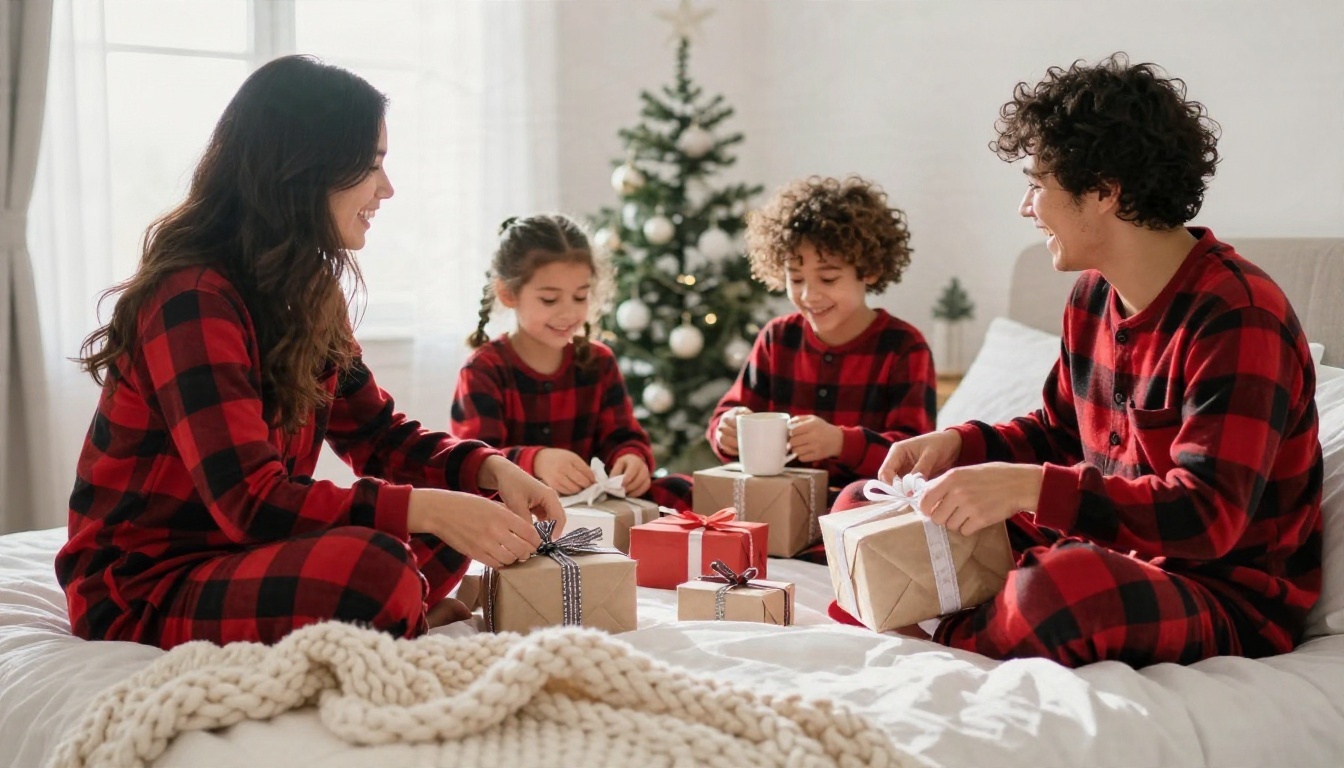
Here is the formula in a single sentence: "A family of four laughing on a bed in red plaid pajamas, cozy bedroom with a small tabletop tree, soft window light from the left, 35mm f/2 slightly high angle, wrinkled linen and knit throw texture, candid Christmas morning mood, Kodak Portra 400 film grain."
Words That Add Realism
Some phrases push the output toward real photography. Others quietly push it toward a glossy illustration. This table shows what to reach for.
Goal
Words that help
Words to avoid
Natural skin
visible pores, laugh lines, flyaway hair
flawless, airbrushed, perfect skin
Warm light
tungsten glow, fireplace key light, golden hour
glowing, magical aura, radiant
Depth
85mm f/1.8, shallow depth of field, creamy bokeh
ultra sharp everywhere, hyper detailed
Film feel
Kodak Portra 400, fine film grain, natural color grading
You do not need to be a photographer, but a handful of lens terms go a long way.
35mm f/2: a natural, slightly wide look that suits rooms and groups
50mm f/1.8: close to how the eye sees, ideal for pets at floor level
85mm f/1.8: flattering portrait compression for couples and faces
100mm macro: extreme detail for hands, mugs, and ornaments
24mm from above: a wide overhead shot for scenes laid out on a rug
Family Prompts to Copy
Family shots are the hardest to get right in real life because everyone has a different level of patience. With AI, you set the tone once and it holds. These prompts are written so that each person has a clear job in the frame.
Pajama Morning Candid
Matching pajamas are the single most popular Christmas photo request, and the candid version beats the posed one every time.
Candid family of four in matching red buffalo plaid pajamas laughing on a big bed with white linen and a chunky knit throw on Christmas morning, parents sitting up with coffee, two kids tearing kraft paper from gifts, soft morning window light from the left, shot at 35mm f/2 slightly high angle, Kodak Portra 400 film grain, visible skin texture and wrinkled linen, cozy bedroom with a small tabletop tree in the background, shallow depth of field
Why it works: the action ("tearing kraft paper") gives everyone a natural expression, and the slightly high angle keeps the bed from looking empty.
Baking Day Story
Storytelling prompts feel more authentic than lineups. A baking scene gives you hands, flour, and real laughter.
Mother and young daughter baking gingerbread cookies in a rustic kitchen, flour dusted on their noses, daughter pressing a star cutter into rolled dough, wooden countertop with cinnamon sticks and icing bags, warm window light from the left, medium close-up at 85mm f/1.8, Kodak Portra 400 film grain, visible flour texture and skin pores, Christmas garland softly blurred behind
💡 Tip: Swap "mother and daughter" for "grandfather and grandson" or "two brothers" and you get a completely different emotional tone from the same scene.
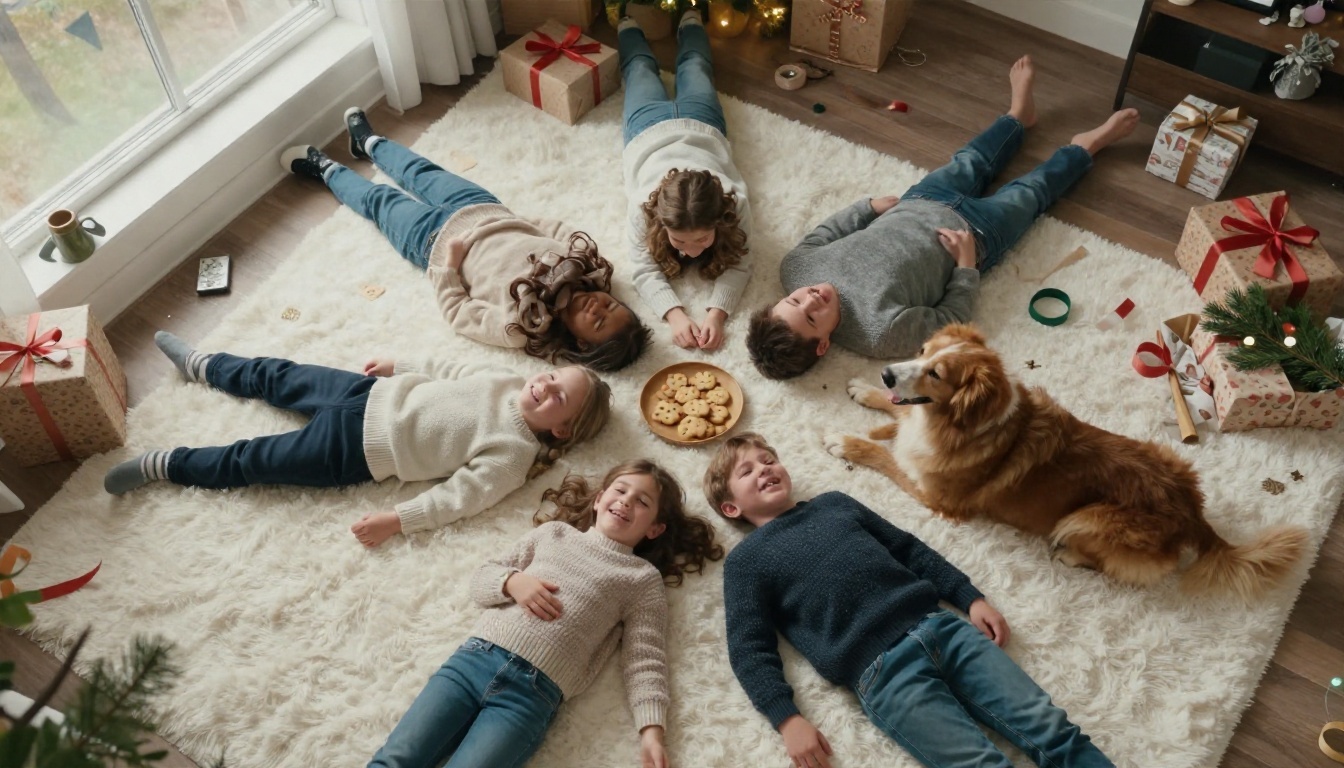
Overhead Rug Shot
When you want everyone in one frame without a stiff lineup, put them on the floor and shoot from above.
Wide aerial overhead shot of a family of four and two dogs lying on a thick white rug in a circle with heads together, cozy sweaters, scattered wrapping paper, ribbons, cookies on a wooden tray and pine branches, soft diffused daylight from a large window above left, 24mm lens f/4 from above, Kodak Portra 400 film grain, realistic fabric and fur textures, joyful smiles
Tree and Fireplace Portrait
The cover image of this article uses a classic setup: three generations in front of a tall tree, a fire on the left, and snow falling outside the window. The prompt is long on purpose, because large groups need more instructions to stay coherent.
Multi-generational family of five posing in front of a tall decorated spruce tree in a cozy farmhouse living room on Christmas Eve, parents in cream and red knit sweaters, two children in plaid flannel pajamas on a wool rug, a grandmother holding a steaming ceramic mug, a golden retriever in a red knit scarf across the children's laps, warm fairy lights and glass baubles, stone fireplace on the left with stockings, snow falling outside a tall window, warm tungsten key light from the left, cool blue window fill from the right, 35mm f/2 at eye level, Kodak Portra 400, fine film grain, candid mid-laugh expressions
Couples Prompts That Feel Real
Couples photos live or die on body language. The trick is to give the pair something to do with their hands and a reason to be close.
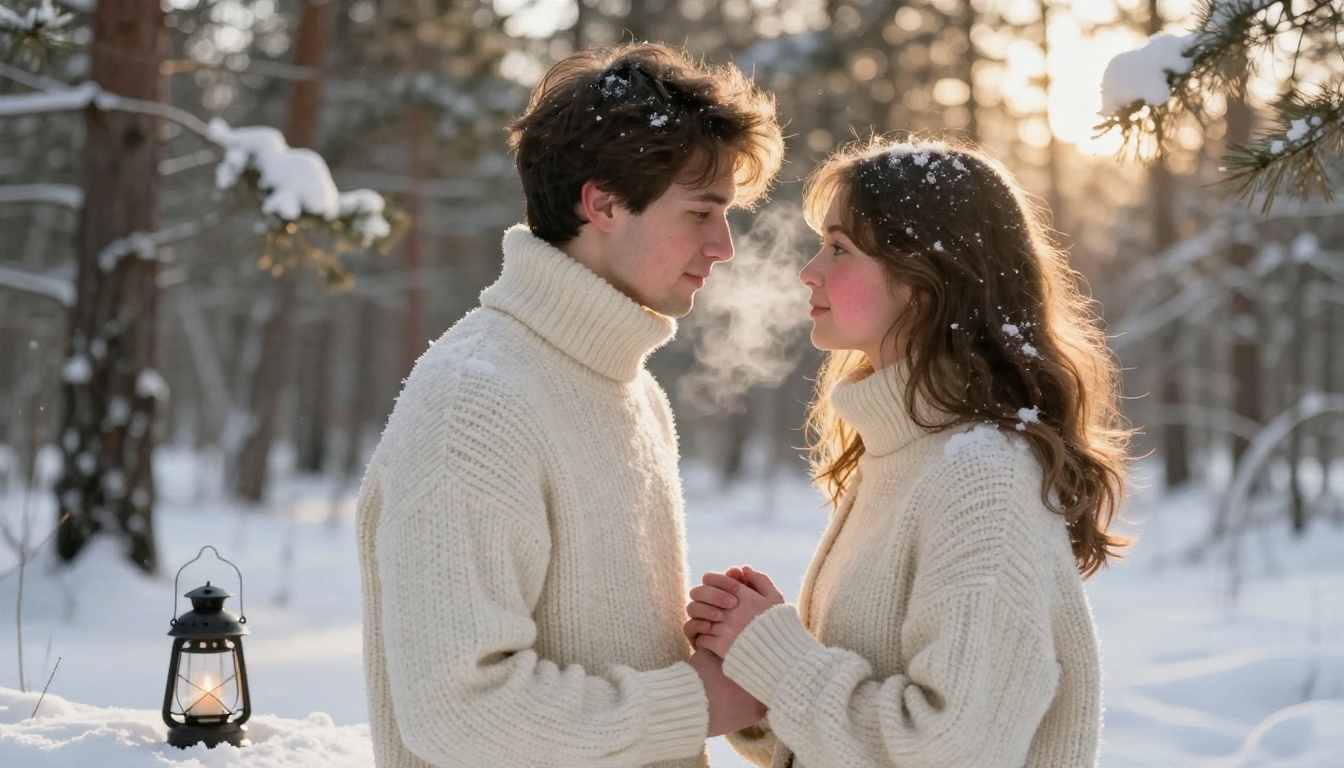
Snowy Forest Embrace
Cold air, warm light, and forehead-to-forehead closeness make for an unmistakably romantic holiday image.
Young couple in thick cream wool sweaters embracing foreheads together in a snowy pine forest at golden hour, fresh powder snow on their shoulders, breath visible in the cold air, he holds her gloved hand, a lantern with a real candle in the snow beside them, low-angle medium shot at 85mm f/1.8, warm low sun backlight from the right creating rim light on hair, Kodak Portra 400 grain, realistic knit texture and rosy cheeks, soft bokeh of snow-laden fir branches
Fireside Details
Not every photo has to show faces. A tight shot of hands and mugs tells the same love story and avoids most facial-accuracy problems.
Close-up of a couple's hands holding two steaming mugs of hot chocolate with marshmallows beside a glowing fireplace, red wool blanket over their laps, warm firelight from the left, a Christmas tree softly blurred in the background, macro detail of ceramic glaze, wool fibers and steam, 100mm macro f/2.8, Kodak Portra 400 film grain, intimate and cozy
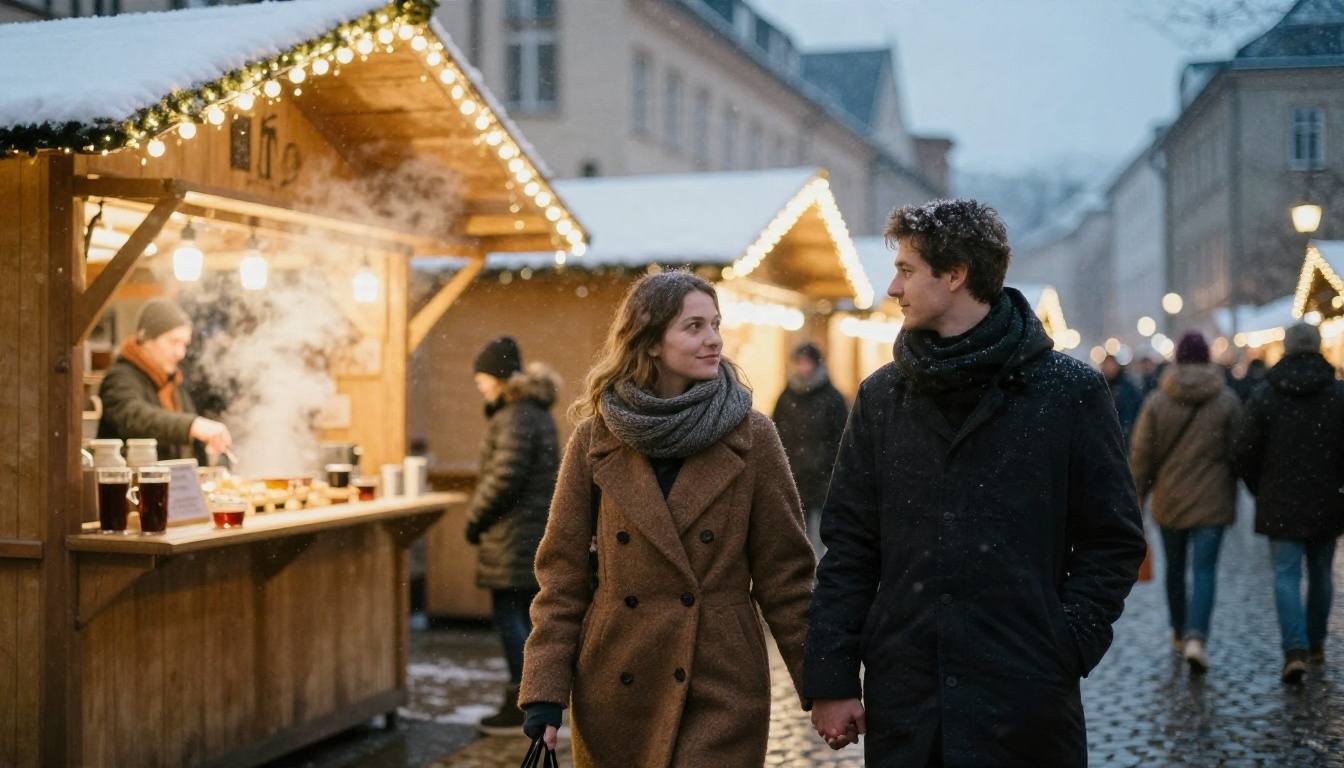
Christmas Market Stroll
Shooting from behind is a clever shortcut. You get atmosphere, warm string lights, and a sense of motion, and the "glance back" adds a human touch.
Couple in long wool coats and scarves walking hand in hand through a cobblestone European Christmas market at dusk, wooden stalls with warm string lights, steam rising from mulled wine, shot from behind at 70mm f/2 with compression, light snowflakes in the air, warm stall glow on their faces as they glance back, Kodak Portra 400 film grain, realistic coat fabric texture, bokeh lights
Pet Prompts That Steal the Show
Pets are the stars of most holiday feeds, and they are also the most forgiving subjects for AI. They never complain about the scarf.
Dog With a Scarf
Golden retrievers, corgis, and poodles all respond well to specific coat descriptions. Name the breed and mention the fur texture.
Fluffy golden retriever sitting proudly beside a decorated Christmas tree wearing a red knit scarf and a small felt reindeer antler headband, wrapped presents with twine around its paws, head tilted, eye-level shot at 50mm f/1.8, warm fairy-light bokeh behind, soft window light from the right, individual golden fur strands and wet black nose detail, wooden floor, Kodak Portra 400 film grain
Cat in a Gift Box
Cats do what cats do, so lean into it. A low angle at the animal's eye level makes the photo feel intimate instead of looking down at a pet.
Orange tabby cat curled inside an open cardboard gift box lined with tissue paper beside a Christmas tree, one paw batting a dangling glass bauble, low-angle shot at 50mm f/1.8 from floor level, warm tungsten fairy light glow from behind, soft natural window light, detailed whiskers and fur texture, shallow depth of field with golden bokeh, Kodak Portra 400 film grain
Kids and Pets in the Snow
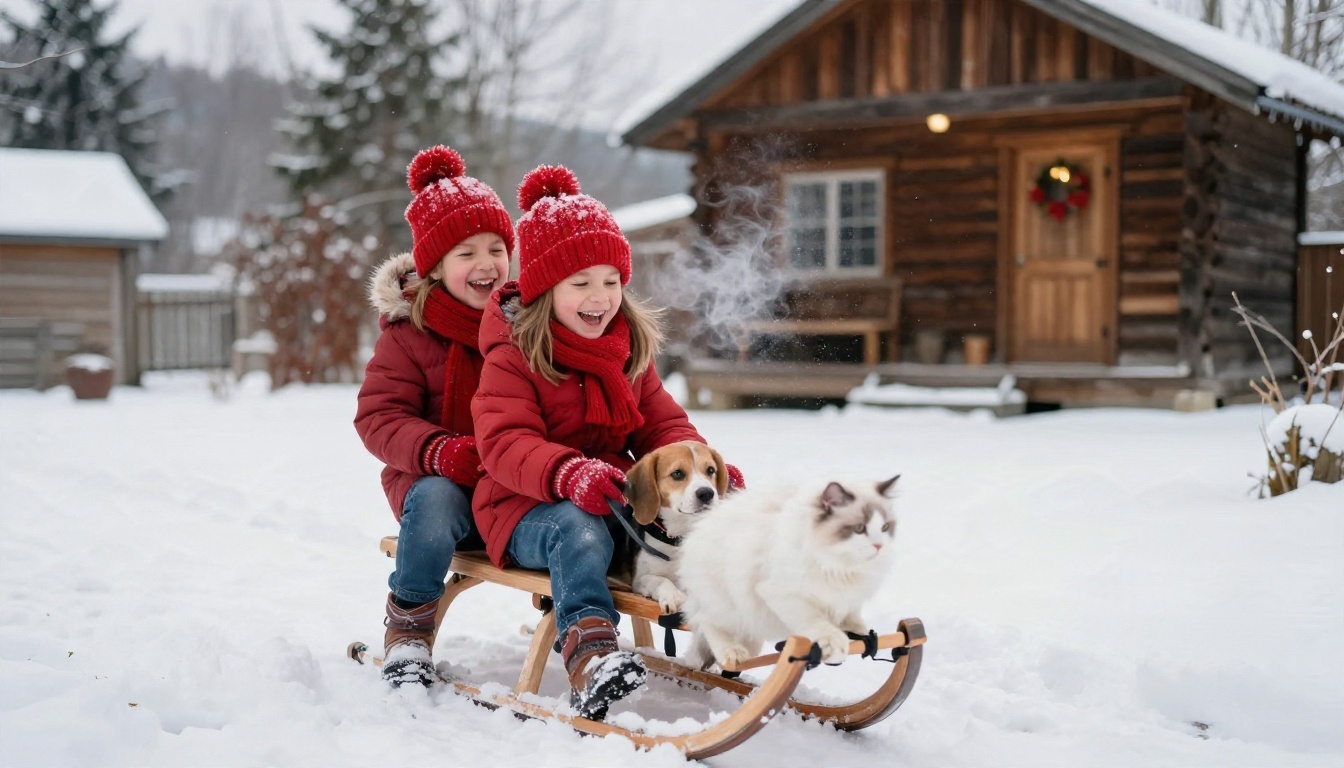
Mixed groups of children and animals are the most charming prompts and also the most likely to go wrong, so keep the numbers small. Two kids and two pets is a sweet spot.
Two children in red hats and scarves with a small beagle and a white fluffy cat on a sled in a snowy backyard, laughing, an old wooden cabin with a lit wreath on the door behind, overcast soft winter daylight, eye-level shot at 35mm f/2.8, breath visible, snow crystals on wool mittens and fur, Kodak Portra 400 film grain, candid joyful action
How to Use Seedream 4.5 on PicassoIA
For realistic holiday portraits, Seedream 4.5 is a strong first pick. It handles long, detailed prompts well, which suits the scene-heavy style used above. Here is a simple workflow.
Paste your prompt. Start with one of the examples above, then swap in your own details such as hair color, sweater color, or pet breed.
Choose a 16:9 or 3:2 ratio for wide scenes like fireplace groups and markets. Use a vertical ratio for card-style portraits.
Generate and compare. Run the same prompt a few times. Small variations in expression and framing can make one result clearly better.
Refine one thing at a time. If the light is too cold, change only the lighting phrase. Changing five things at once makes it impossible to know what helped.
Save your best prompt. Keep a note of any wording that worked so you can reuse it for next year's card.
💡 Tip: If you want to edit an existing photo, for example to add a tree behind a family picture you already have, try an editing-focused model such as Nano Banana or Nano Banana Pro.
Other Models Worth Trying
Different models have different strengths, so it pays to test the same prompt in more than one place.
Even strong prompts misfire sometimes. These are the issues that show up most in holiday portraits, with practical fixes.
Hands and Faces Look Off
Large groups strain every model. If faces start to blur or hands look odd, reduce the number of people, move the camera slightly farther away, or build the scene around hands holding objects like mugs, ornaments, or gifts. Close crops of hands and props are also a nice way to make a card feel personal without risking a bad face.
The Image Looks Too Glossy
Over-polished, plastic-looking skin usually comes from words like "perfect," "flawless," or "ultra detailed." Replace them with visible pores, laugh lines, and flyaway hair, and always include a film stock such as Kodak Portra 400. A little grain is your friend.
Pets Do Not Match Your Pet
Generic prompts give generic animals. Include breed, coat color, ear shape, and one unique detail, such as "white chest patch" or "one floppy ear." If you have a photo of your pet, an image-editing model can use it as a reference to get much closer.
Lights Look Fake
Real Christmas lights are small, warm, and slightly uneven. Ask for warm white fairy lights with soft bokeh, specify one main light direction, and avoid "glowing" or "magical." The room should feel lit by the lights, not decorated with effects.
Quick Troubleshooting Table
Problem
Likely cause
Fix
Waxy skin
Words like "perfect" or "flawless"
Add pores, grain, candid expression
Extra fingers
Too many people or hands in view
Fewer subjects, closer crop on objects
Flat lighting
No light direction in prompt
Name the source: window left, fire right
Messy background
Too many props listed
Keep three or four props, blur the rest
Stiff poses
"Posing" or "smiling at camera"
Describe an action: laughing, unwrapping, baking
Build Your Own Holiday Photo Set
Once you have a few favorites, you can plan a full set instead of a single image. A good Christmas card or social post usually benefits from variety: one wide family shot, one detail close-up, one candid moment, and one pet portrait. That mix gives you options for a card front, a card back, and a handful of posts.
A Simple Shot List
Wide scene: the tree and fireplace group portrait
Candid action: baking, unwrapping, or sledding
Detail shot: hands, mugs, ornaments, or paws
Pet portrait: eye-level with festive props
Couple moment: forest, market, or fireside
Keep Names and Faces Consistent
If you want the same people across several images, describe them the same way each time: hair color, glasses, sweater color. Repeating the same short description is the easiest way to keep a series feeling like one shoot. For closer likeness to real people, use an image-editing model with a reference photo and only with people who have agreed to be included.
💡 Tip: Printing? Generate at the highest resolution available and upscale if you need more pixels. A grainy film look prints beautifully, but soft, blurry edges do not.
Try Your Own Christmas Shoot Today
You now have ready-made prompts for families, couples, and pets, a formula to build your own, and fixes for the usual problems. The fastest way to improve is to pick one prompt from this page, change three details so it fits your own home and people, and generate it on PicassoIA. Run it a few times, tweak the light, try a different model, and keep the version that makes you smile.
Open Seedream 4.5 on PicassoIA, paste the fireplace portrait or the pajama morning prompt, and see what comes back. Then try the dog with the scarf, or the market stroll for two. Your holiday card is a few prompts away, and it will not require a single reindeer wrangler.