Search for "Flux" and you get a pile of names: Schnell, Dev, Pro, Ultra, Kontext, Fill, Klein, Flex, Max. Some are free to download, some bill you per image, and a few carry license terms that quietly rule out commercial work. If you only want good pictures from a text box, that is a lot of homework. This article sorts the Flux Black Forest Labs models into plain categories: what is free, what costs money, which prompts get the best results and the fastest way to use Flux online without installing anything.
💡 Quick answer: Flux Schnell and Flux 2 Klein 4B are the most permissive open options. Flux 2 Pro is the best all-round paid pick. Flux 2 Max is for hero images where the extra cost is worth it. Everything else is a specialist tool for editing, variations or custom styles.
What the Flux Family Actually Is
Black Forest Labs is the German research company founded by former Stable Diffusion engineers. Its Flux models became the default choice for photorealism because they handle hands, text, skin texture and complex prompts far better than most earlier open models. The lineup splits into two generations, and knowing which one you are looking at saves money.
Flux 1 Models Still in Use
The first generation arrived in 2024 and is still widely deployed because it is fast and cheap.
- Flux Schnell: the speed model. It generates in a handful of steps, uses an open Apache 2.0 license and is perfect for drafts and bulk ideas.
- Flux Dev: higher quality than Schnell, with open weights under a non-commercial license for the downloadable version.
- Flux 1.1 Pro: a hosted-only model with better prompt following and cleaner detail.
- Flux 1.1 Pro Ultra: pushes output to roughly four megapixels with a natural, photographic look.
- Flux 1.1 Pro Ultra Finetuned: the same engine, aimed at custom-trained looks.
Flux 2 Variants
The second generation, released in late 2025, is built around a larger architecture, better reference-image handling and stronger text rendering. It comes in tiers:
There is also a video-side release, Flux 3, which generates clips with synced audio. This article stays on images, but it shows where Black Forest Labs is heading.
Free Options That Really Exist
"Free" means three different things with Flux, and mixing them up is how people end up with a legal problem or a surprise bill.

Open Weights and Licenses
Open weights means you can download the model and run it on your own graphics card. It does not automatically mean you can sell what you make with no limits. Here is the picture as it stands today:
- Flux Schnell: Apache 2.0. The clearest free option for personal and commercial use.
- Flux 2 Klein 4B: reported under Apache 2.0, which makes it the most permissive Flux 2 model.
- Flux 1 Dev, Flux 2 Dev and Flux 2 Klein 9B: released under Black Forest Labs' non-commercial license. Personal and research use is fine. Serving the model inside a paid product needs a separate commercial agreement.
Black Forest Labs has said that images you generate yourself can generally be used commercially, while the restriction targets deploying the weights as a service. License terms change, so read the current text on the model card before you build a business on any checkpoint.
💡 Hardware reality check: Running Flux locally usually means a recent NVIDIA card with plenty of video memory. The small Klein models are friendlier, but the big ones will crawl or fail on a laptop.
Free Online Tries
Black Forest Labs itself does not offer an unlimited free hosted tier that I could confirm. The hosted models are billed per image. Where free access exists, it usually comes from a platform giving away a starter allowance. Some Flux pages on PicassoIA, such as Flux 2 Flex and Flux 2 Klein 9B Base LoRA, are listed as free to try. Check the current allowance on the model page before you plan a batch, since promotions change.
What Flux Costs Per Image
Prices below are approximate hosted API rates that were circulating at the time of writing. Different resellers add margins, and rates move, so treat them as a budgeting range rather than a quote.

Rough Price Tiers
| Model | Approximate cost per image | Notes |
|---|
| Flux Schnell | A fraction of a cent to a few cents | Cheapest for drafts |
| Flux 2 Klein (4B and 9B) | Around 1 to 2 cents | Small models, low cost |
| Flux 2 Pro | Around 3 cents for text-to-image | Editing with references costs a bit more |
| Flux 2 Flex | From about 5 to 6 cents | Pay for extra control |
| Flux 2 Max | From about 7 cents at one megapixel | Scales up with resolution |
| Flux 1.1 Pro Ultra | Several cents per 4MP image | Fixed high-resolution output |
Many Flux 2 prices scale with megapixels. A 1MP image costs the base rate, and a 4MP image costs noticeably more. Reference images used for editing can also add to the bill.
How to Keep Costs Low
- Draft with a cheap model. Test composition and wording on Schnell or Klein, then switch to Pro for the final render.
- Match resolution to the job. A social post does not need four megapixels.
- Lock a seed. When you find a layout you like, reuse the seed and change only one phrase at a time.
- Batch your edits. One carefully written edit instruction is cheaper than five vague ones.
- Upscale later. Generate at normal size and run a super resolution step on the winners only.
💡 Rule of thumb: If you will generate more than a few hundred images a month, compare per-image billing with a platform subscription that bundles several models.
Prompts That Work on Flux
Flux responds well to natural sentences. You do not need keyword soup or weighting tricks. Describe the subject, the setting, the light and the camera, in that order. The model rewards specific physical detail such as fabric, weather and lens choice.
A Portrait Prompt
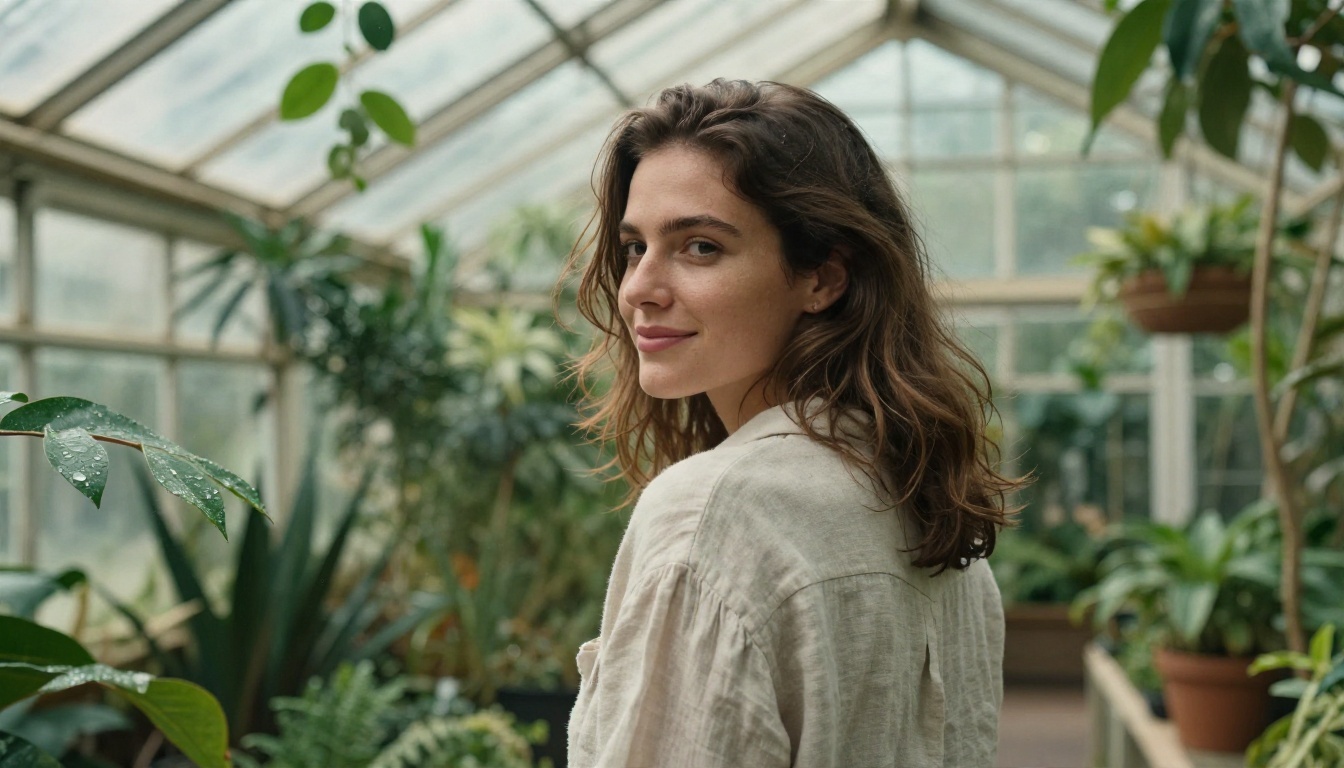
A candid portrait of a woman in a sunlit botanical greenhouse, linen shirt, looking over her shoulder with a soft smile. Glass roof diffusing midday light, water droplets on green leaves, light humid haze. 85mm lens at f/1.8, fine skin texture, flyaway hair, Kodak Portra 400 film grain.
Why it works: it names the lens and aperture, so the background blur looks optical rather than painted. "Fine skin texture" pushes away the plastic look. The film stock gives a color palette without any heavy styling.
A Landscape Prompt
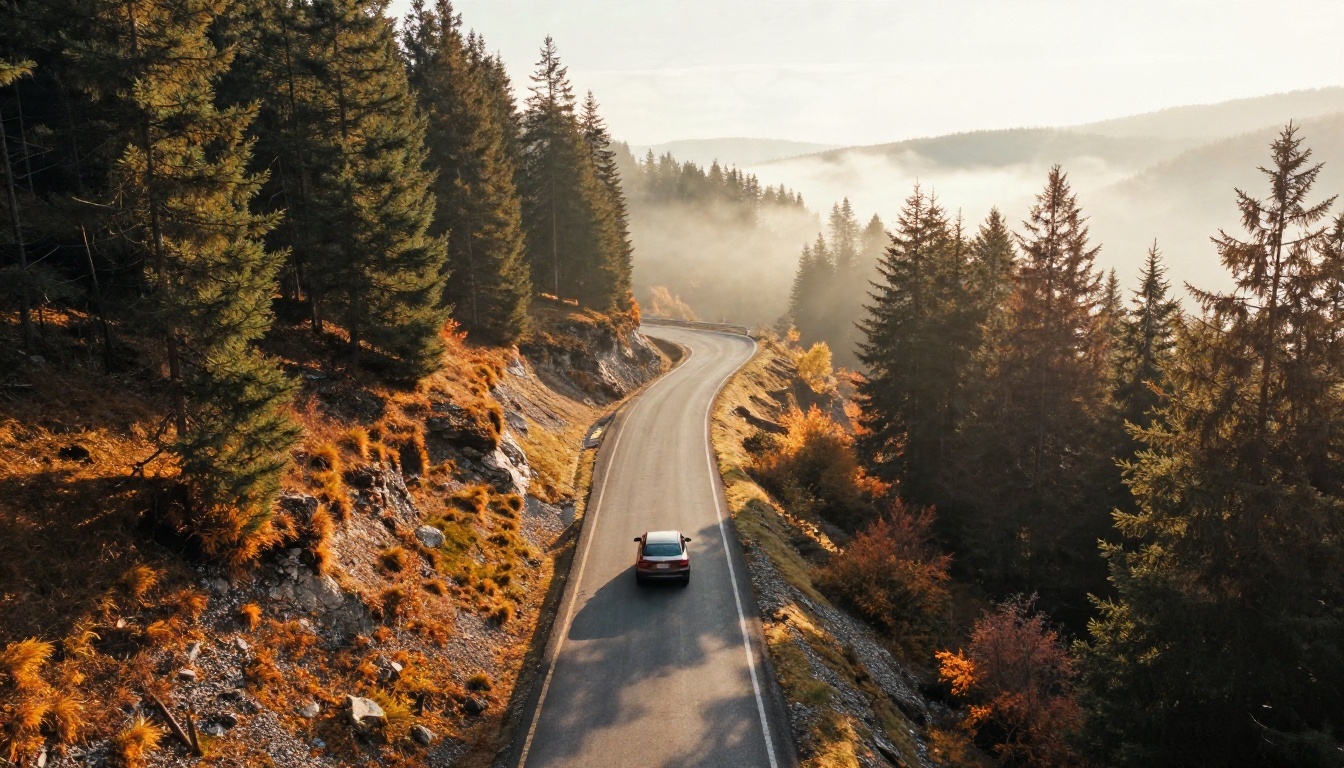
Aerial view of a winding mountain road through an autumn pine forest at golden hour. A single small car on the asphalt, low sun from the left casting long shadows, mist in the valley below. 24mm wide lens, crisp textures of bark, gravel and fallen leaves.
Flux handles scale and distance well when you give it a clear viewpoint such as "aerial" or "low angle". Add one small human element, like the car above, to give the scene a sense of size.
A Product Prompt
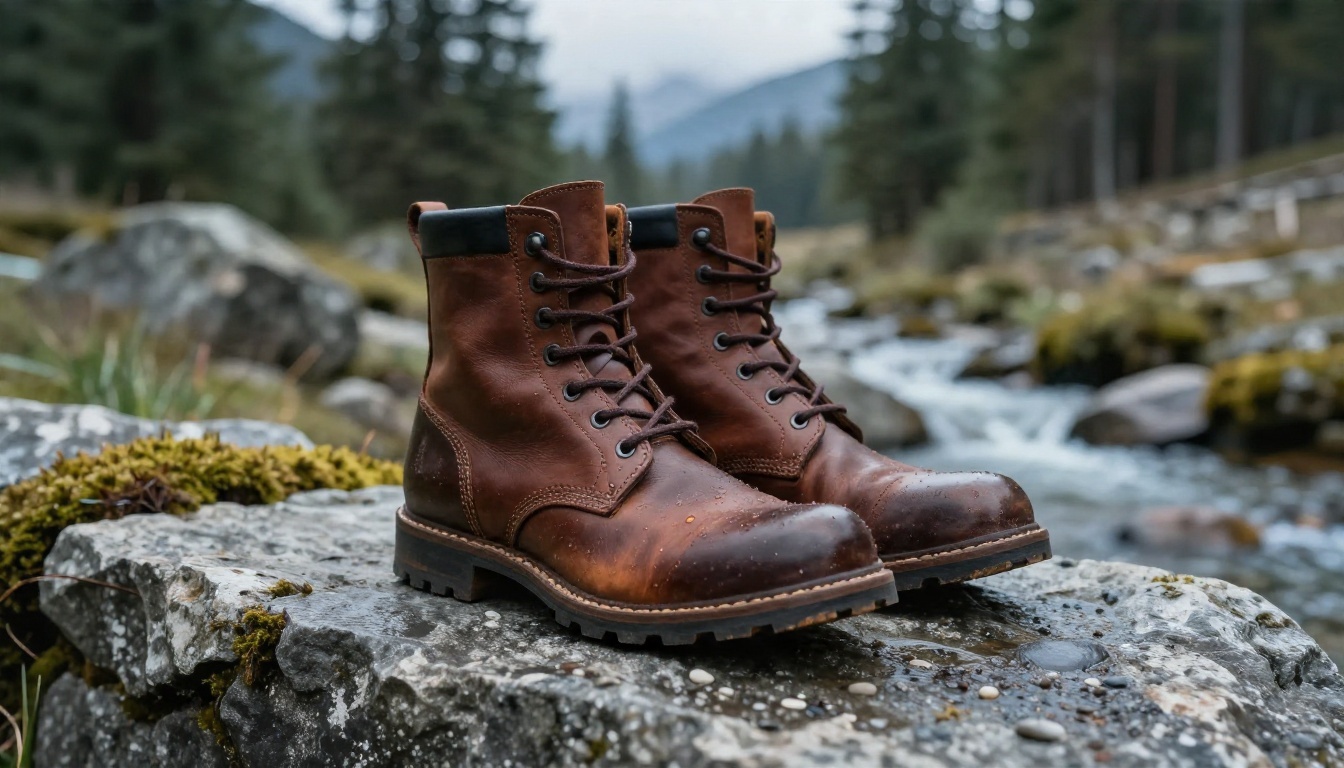
Leather walking boots on a rough stone ledge beside a mountain stream, side view at ground level. Soft cool overcast light from the right, moss and wet pebbles in the foreground, blurred pine trees behind. 100mm macro lens at f/2.8, visible leather grain, stitching and water droplets.
For products, state the surface, the light direction and the lens. Those three details do most of the work.
Prompt Habits Worth Keeping
- Put the subject first. Flux weights the start of the prompt more heavily.
- Write light direction. "Window light from the left" beats "nice lighting".
- Quote any text. If a sign or label must appear, put the exact words in quotation marks and keep it to a few words.
- Skip negative prompts. Flux models generally ignore them, so describe what you want instead.
- Change one thing per run. It is the only reliable way to see what each phrase does.
Using Flux Online Without Setup
Running a model at home sounds appealing until you meet driver versions, memory errors and a 30 GB download. The online route trades that for a text box. On PicassoIA, the Flux family sits next to other image models, so you can send the same prompt to several of them and compare the output yourself.

How to Use Flux 2 Pro on PicassoIA
Flux 2 Pro is a sensible default because it handles both text prompts and photo input.
- Open the model page. Go to the Flux 2 Pro page on PicassoIA.
- Write a full sentence prompt. Use the subject, setting, light and lens structure from the examples above.
- Pick an aspect ratio. Use 16:9 for banners, 1:1 for avatars and 4:5 or 9:16 for social posts.
- Add a reference photo if needed. Upload an image when you want the model to keep a face, product or color palette consistent.
- Generate and compare. Run two or three variations, then keep the best seed.
- Refine one detail at a time. Change the light, the lens or the setting, but not all three.
Parameter tips:
- Keep prompts between roughly 40 and 120 words. Shorter prompts leave too much to chance, and longer ones start to contradict themselves.
- If faces look too smooth, add "visible pores" or "natural skin texture".
- For a harder, more graphic look, name a hard light source such as "direct afternoon sun".
- If the result is close but not right, switch to Flux 2 Flex for finer control, or step up to Flux 2 Max when you need the best possible detail.
Editing With Flux Fill and Kontext
Flux is not only about new images. Several models in the family fix, extend or restyle photos you already own.

💡 Editing tip: Describe only the change. "Replace the red umbrella with a black one" works better than rewriting the whole scene, because the model already knows the rest of the photo.
Which model for which job:
| Task | Pick |
|---|
| Remove an object or fill a gap | Flux Fill Pro |
| Extend a photo wider | Flux Fill Pro or Dev |
| Change one thing by instruction | Flux Kontext Fast |
| Blur a busy background | Depth of Field |
| Clean text from a sign | Text Removal |
| Reuse a custom style | A LoRA model |
5 Mistakes That Waste Credits
Most wasted generations come from the same handful of habits.
- Going straight to the most expensive model. Max is excellent, but a draft on Schnell or Klein tells you whether the idea works at a fraction of the price.
- Stuffing the prompt with adjectives. "Ultra detailed stunning masterpiece 8K" adds nothing. A concrete lens, light and material does.
- Assuming free weights mean free commercial use. Check the license on Dev and Klein 9B before using them in a paid product.
- Ignoring resolution pricing. A 4MP render can cost several times a 1MP one. Generate at the size you will actually publish.
- Changing everything between runs. If you alter the subject, the light and the camera at once, you will never know which change helped.
A sixth, smaller one: forgetting the seed. When a result is nearly perfect, save the seed so you can reproduce it and adjust a single word.
Which Flux Should You Pick
Here is a short decision list, based on what you are trying to do:
- Quick experiments and volume: Flux Schnell or Flux 2 Klein.
- Client-ready photorealism: Flux 2 Pro.
- Fine control over steps and guidance: Flux 2 Flex.
- Large prints or hero banners: Flux 2 Max or Flux 1.1 Pro Ultra.
- Fixing or extending a photo: Flux Fill Pro or Flux Kontext Fast.
- A consistent custom style: A LoRA version of Dev, Schnell or Klein.
- Short clips with sound: Flux 3 on the video side.
If a model does not give you the look you want, you are not locked in. PicassoIA also hosts other image models such as Seedream 5 Pro and Riverflow v2.5 Pro, so you can test the same prompt side by side and pick the winner.
Start Making Your Own Images
The fastest way to understand what separates these models is to run the same prompt through three of them. Take one of the example prompts above, open Flux 2 Pro, then try Flux Schnell and Flux 2 Max with identical wording. Compare skin, light and detail, then decide which one deserves your budget.
You do not need a graphics card, a download or a license review to begin. Pick a subject you care about, write it as a short scene with a lens and a light direction, and generate. Browse every available model at picassoia.com/en/all-models and build your own shortlist of favorites on PicassoIA.


