Most people type a few loose words into Dreamina, get something that looks like a stock photo from 2012, and decide the tool is mediocre. It is not. The tool is fine. The prompt is the problem. Dreamina, ByteDance's creative platform, runs on the Seedream family for images and the Seedance family for video, and both respond to specific, structured language far better than to vague adjectives. Give them a clear subject, a light source, a lens and a mood, and the results change overnight.
This article gives you prompts for Dreamina that you can paste, tweak and reuse. You will find a simple formula, nine photographic image examples with the exact wording behind each one, a section on video motion prompts, a table of common mistakes, and a walkthrough for running the same style of prompts on PicassoIA with the models that power this workflow.
💡 Quick rule: A good prompt reads like a photographer's shot note, not like a wish. Say what is in the frame, where the light comes from, and which lens you would use.
What Dreamina Prompts Need
Before the examples, a short look at why some prompts work and others fall flat. Dreamina's image models read your text as a description of a scene. They are not guessing your intent, so every missing detail gets filled with the safest, most average choice. Average is the enemy.
The Five Part Formula
Every prompt in this article follows the same skeleton. Once you see it, you can build your own in under a minute.
| Part | What it answers | Example phrase |
|---|
| Subject and action | Who or what is in the frame, doing what | "an elderly fisherman looking just off camera" |
| Environment | Where the scene happens | "misty harbor dock at dawn, wet rope behind him" |
| Light | Direction, softness, time of day | "soft diffused overcast light from the right" |
| Camera and lens | Angle, focal length, aperture | "85mm f/1.8, shallow depth of field" |
| Texture and finish | Surface details, grain, color mood | "visible skin pores, Kodak Portra 400 grain" |
Skip any one of these and the model will improvise. Skip three and you get the generic look people complain about.
Why Order Matters
Put the subject first. Models weigh the start of a prompt more heavily than the end, so a description that opens with "cinematic, moody, beautiful, 8K" and mentions the actual subject at the tail wastes its strongest position on filler. Open with the thing you want to see, then layer the rest.
Keep each prompt between roughly 40 and 120 words for images. Shorter prompts leave gaps. Much longer ones start to contradict themselves, and the model quietly drops whichever instruction came last.
💡 Tip: Write the lighting as a direction, not a feeling. "Soft window light from the left" gives the model something to render. "Beautiful lighting" gives it nothing.
Image Prompts That Work
These first four prompts cover the subjects people request most: faces, food, landscapes and products. Each one is shown with its result.
Portrait With Real Skin
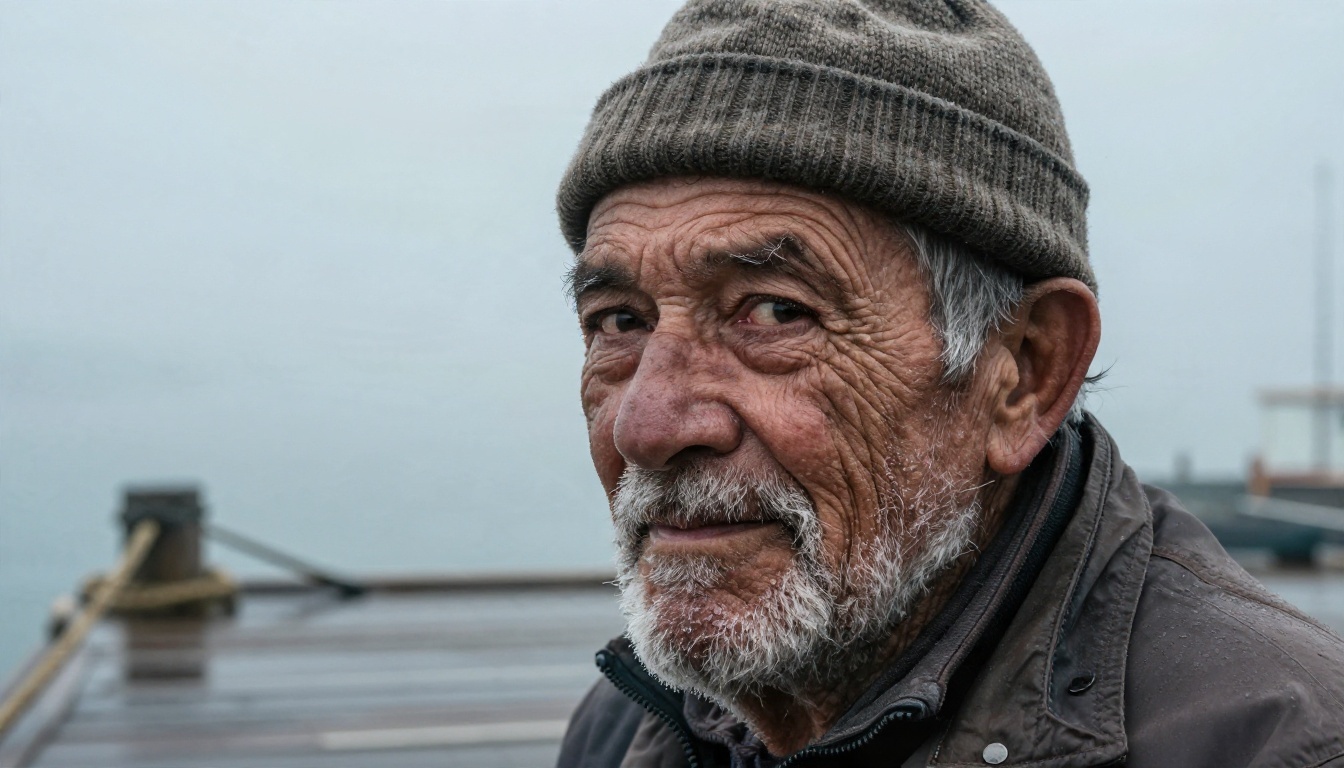
Portraits fail when the prompt never mentions texture. The result is the waxy, over smoothed face that gives AI images away. Name the pores, the wrinkles, the stubble.
Prompt to paste:
Close-up portrait of an elderly fisherman with deep weathered wrinkles and a white stubble beard, wearing a wool cap, looking just off camera on a misty harbor dock at dawn, soft diffused overcast light from the right, wet rope and wooden pilings blurred behind him, 85mm f/1.8 shallow depth of field, visible skin pores, salt crystals on the wool, Kodak Portra 400 film grain.
Why it works: the eyeline ("just off camera") gives the face a story, the overcast light avoids harsh shadows, and "salt crystals on the wool" forces the model to render a tiny detail, which pulls the whole image toward realism.
Food That Looks Edible
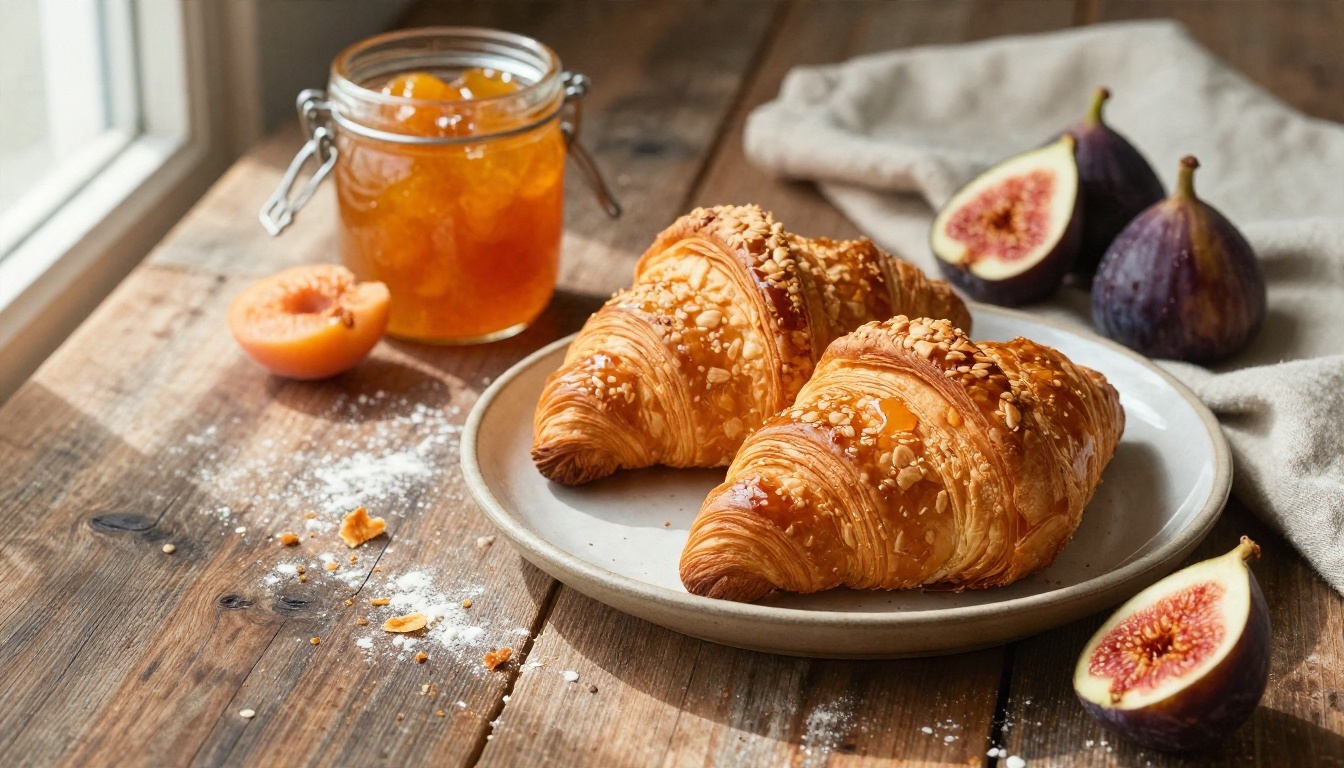
Food prompts need an angle and a surface. Without them, you get a plate floating in a gray void.
Prompt to paste:
Overhead flat lay of a rustic breakfast table: a ceramic plate with golden croissants, a glass jar of apricot jam, sliced figs, and a linen napkin, scattered flour and crumbs on a weathered walnut surface, soft window light from the upper left creating gentle shadows, 35mm f/4 top down angle, flaky pastry texture, glossy fruit highlights, natural film grain.
The scattered crumbs are the secret. A perfectly clean table looks staged and artificial, while a few crumbs say someone just sat down.
Landscapes With Depth
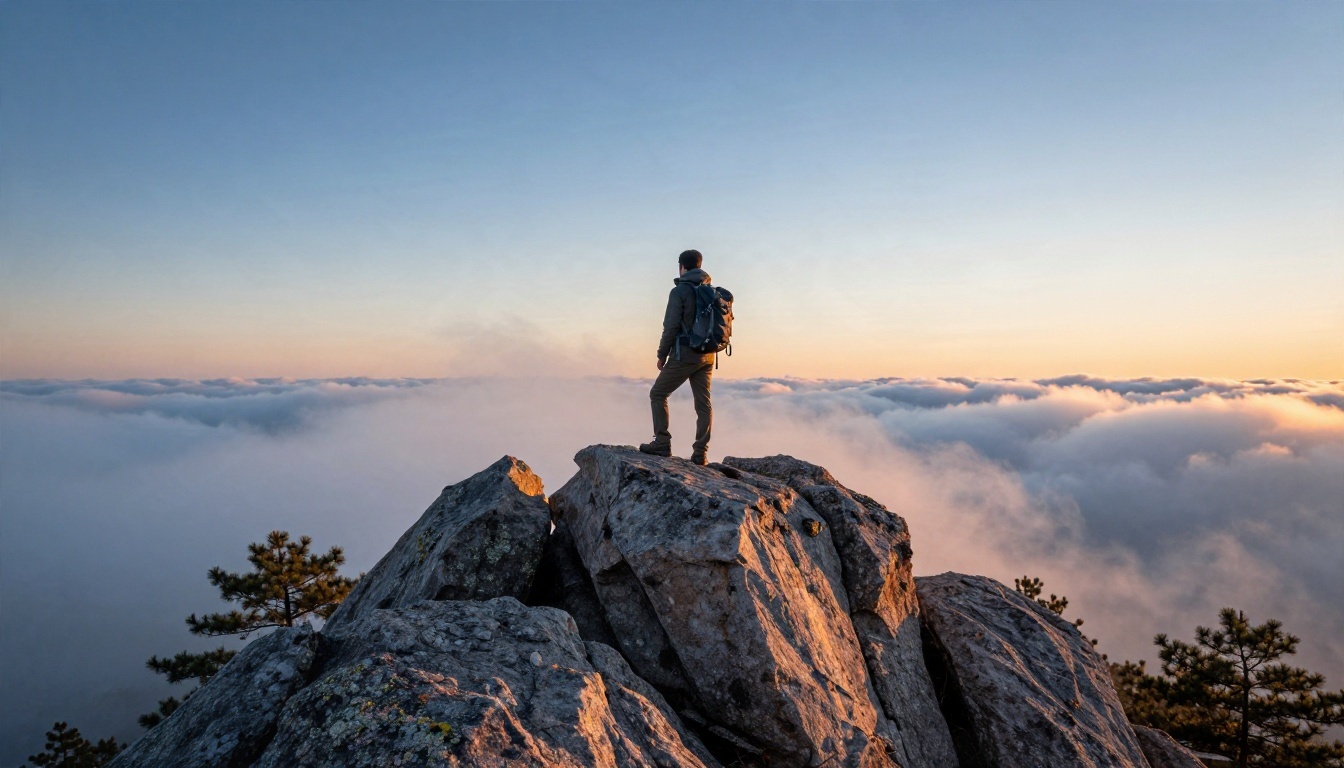
Landscape prompts shine when you describe layers: foreground, middle, far distance. A low angle adds scale.
Prompt to paste:
Low angle wide shot of a lone hiker standing on a granite ridge above a sea of clouds at sunrise, orange light grazing the rocks from behind, a faint mist drifting through pine trees below, backpack and wind ruffled jacket in crisp detail, 24mm f/8 lens, deep focus, lichen textures on stone, cool blue shadows against warm highlights, natural film grain.
Notice "cool blue shadows against warm highlights." Naming a color contrast gives the model a palette to commit to, which keeps the scene from drifting into muddy orange.
Product Shots For Stores
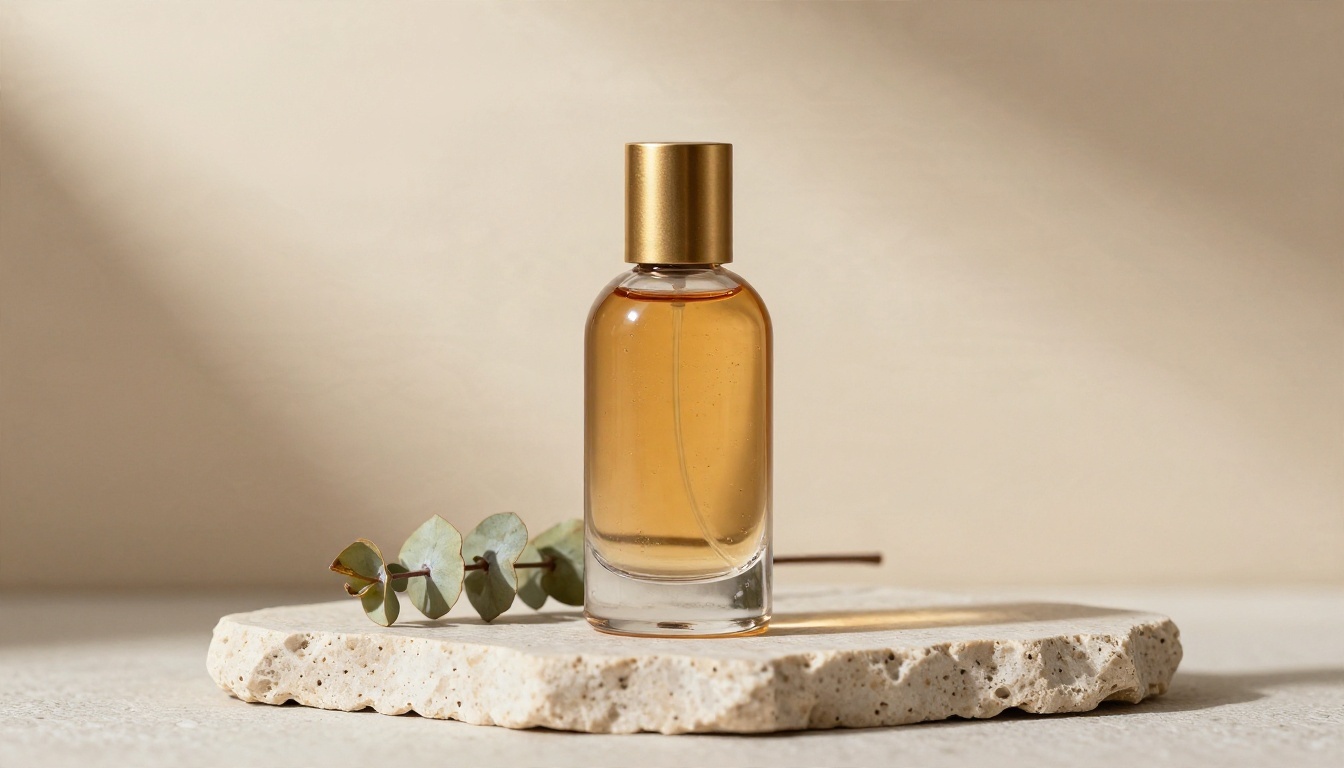
Product photography is where Dreamina style prompts earn money. The trick is restraint: one object, one surface, one light.
Prompt to paste:
Product photograph of a minimalist amber glass perfume bottle with a brushed brass cap resting on a slab of pale travertine stone, a single dried eucalyptus branch beside it, soft side light from the left with a gentle gradient shadow on a warm beige wall, 100mm macro f/5.6, clean glass reflections, fine stone pores, subtle film grain.
Swap the bottle for a candle, a watch or a pair of sunglasses and the structure still holds. That is the point of a formula.
💡 Tip: Build a prompt library in a plain notes file. When a prompt works, save it with the subject swapped for a placeholder. In a month you will have a personal toolkit that beats any public list.
More Image Examples Worth Saving
The next four prompts push into styles that need a little more care: people in motion, fashion, interiors and extreme close ups.
Street Scenes After Rain
Wet pavement is a gift for realism. It adds reflections, texture and mood in one phrase.
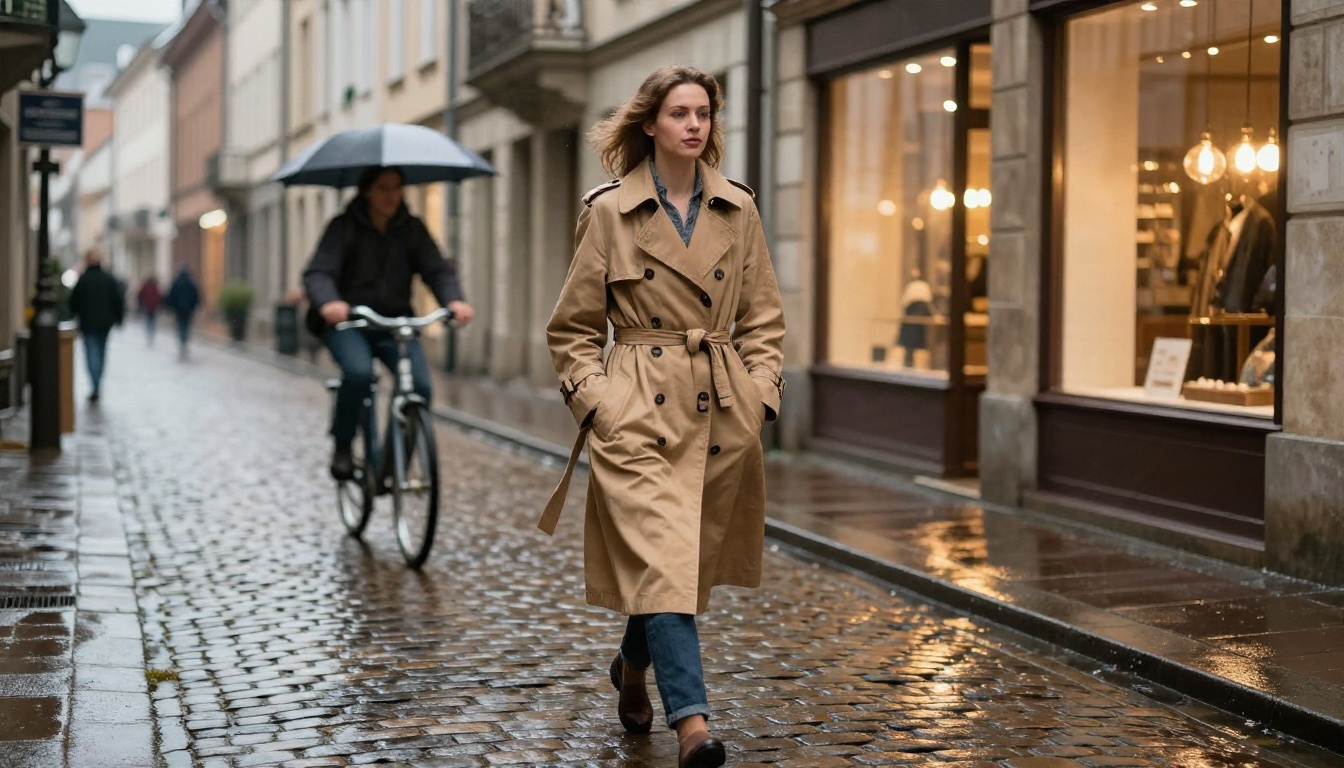
Prompt to paste:
Street photograph of a woman in a camel trench coat crossing a wet cobblestone lane in an old European town after rain, a cyclist blurred behind her, warm shop windows reflecting on the stones, late afternoon overcast light, 50mm f/2 lens at eye level, glistening wet texture, fabric folds in the coat, slight motion blur on the bicycle, Kodak Portra 400 grain.
The blurred cyclist is intentional. Asking for motion blur on a secondary subject keeps the main subject sharp and gives the frame a sense of a captured moment.
Fashion With Natural Light
Fashion prompts tend to over describe the outfit and under describe the light. Flip that ratio.
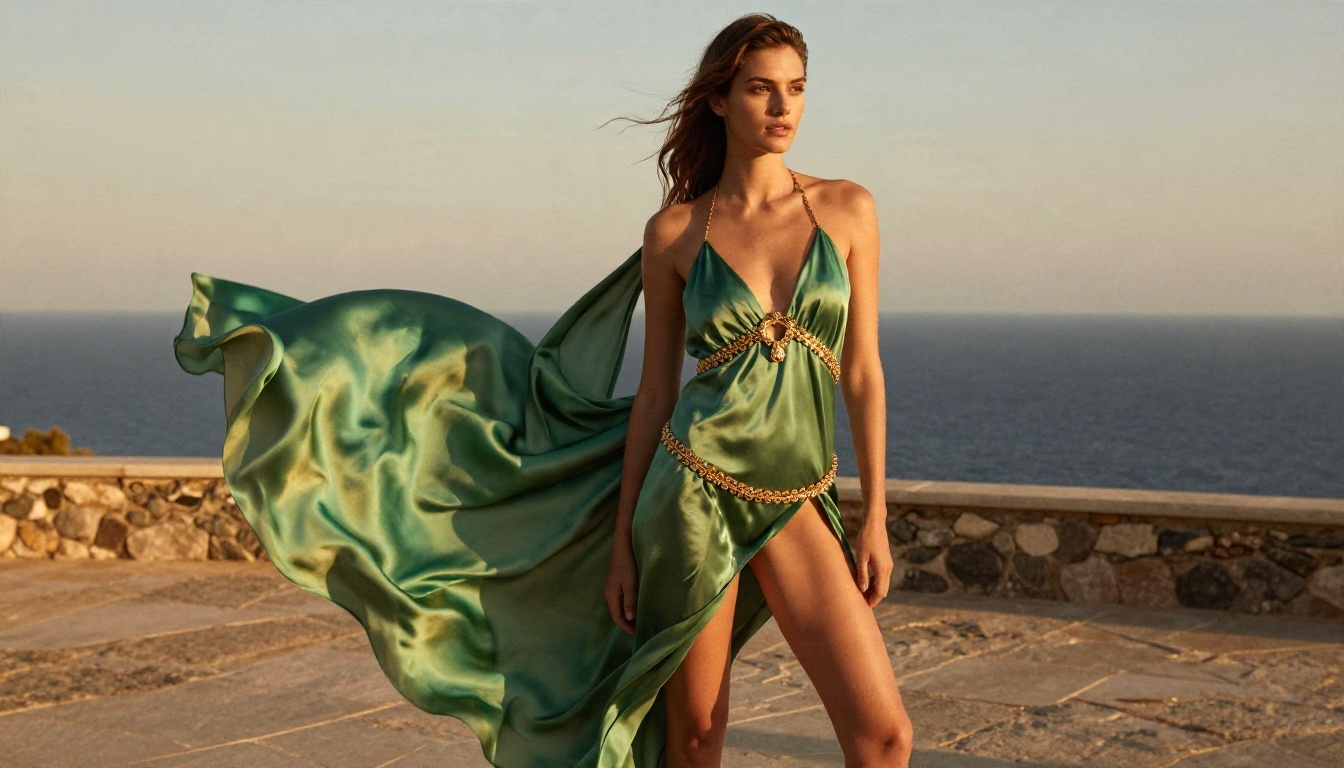
Prompt to paste:
Fashion editorial of a model in a flowing emerald silk dress with delicate gold jewelry standing on a sunlit limestone terrace overlooking the Mediterranean, wind lifting the fabric, warm golden hour backlight with a soft rim on her shoulders, 70mm f/2.8 lens, three quarter body framing, fine silk sheen, sea haze in the background, natural skin texture, film grain.
"Soft rim on her shoulders" is a lighting term that photographers use constantly. The model recognizes it and produces that glowing edge that separates the subject from the background.
Interiors With Life
Empty rooms look like catalog renders. A sleeping cat, a rumpled blanket or a half drunk cup of tea makes the space feel lived in.
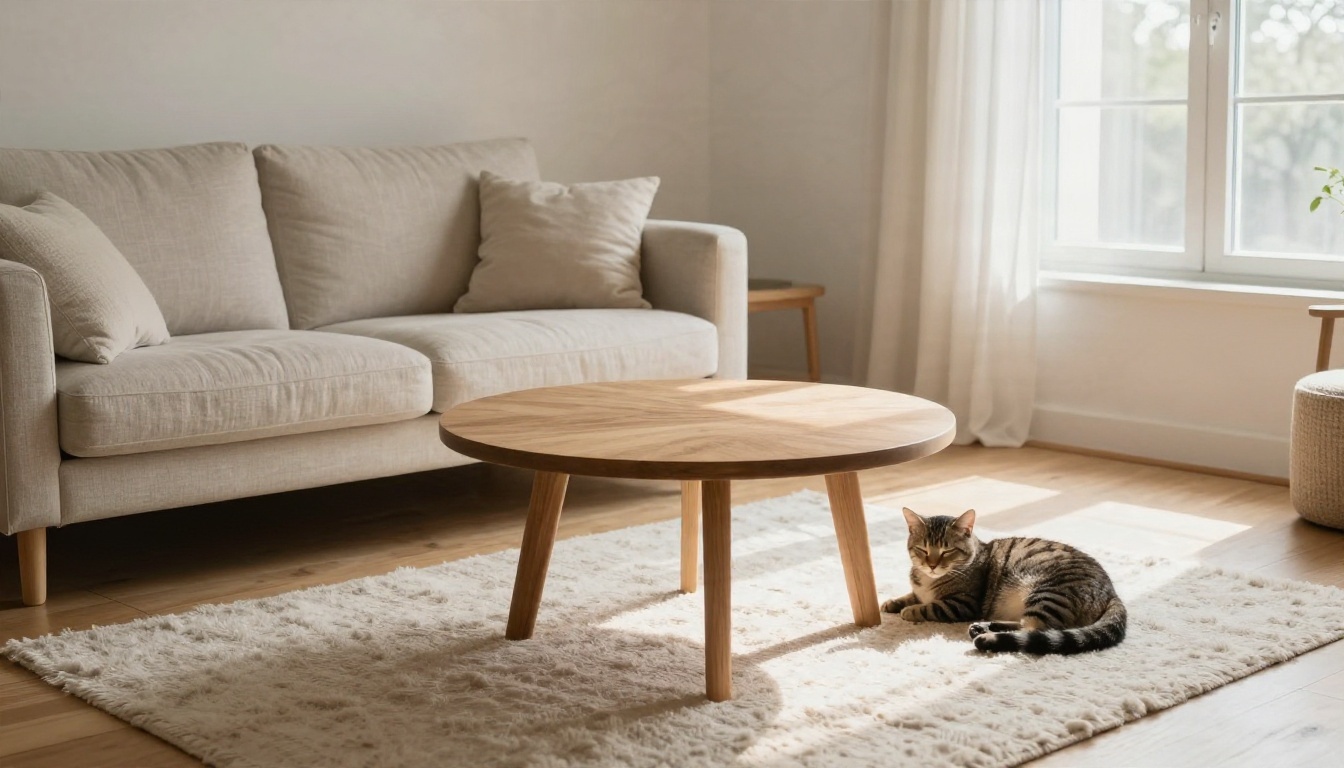
Prompt to paste:
Wide interior photograph of a Scandinavian living room with a linen sofa, a round oak coffee table, a large window with sheer curtains, and a sleeping tabby cat on a wool rug, soft morning light streaming from the right across the floorboards, 24mm f/5.6 slightly high angle, visible wood grain and knit textures, gentle haze, muted cream and sage palette, film grain.
Macro Shots With Tiny Detail
Macro is the easiest way to see how much a model can resolve. Ask for specifics at a scale most people never look at.
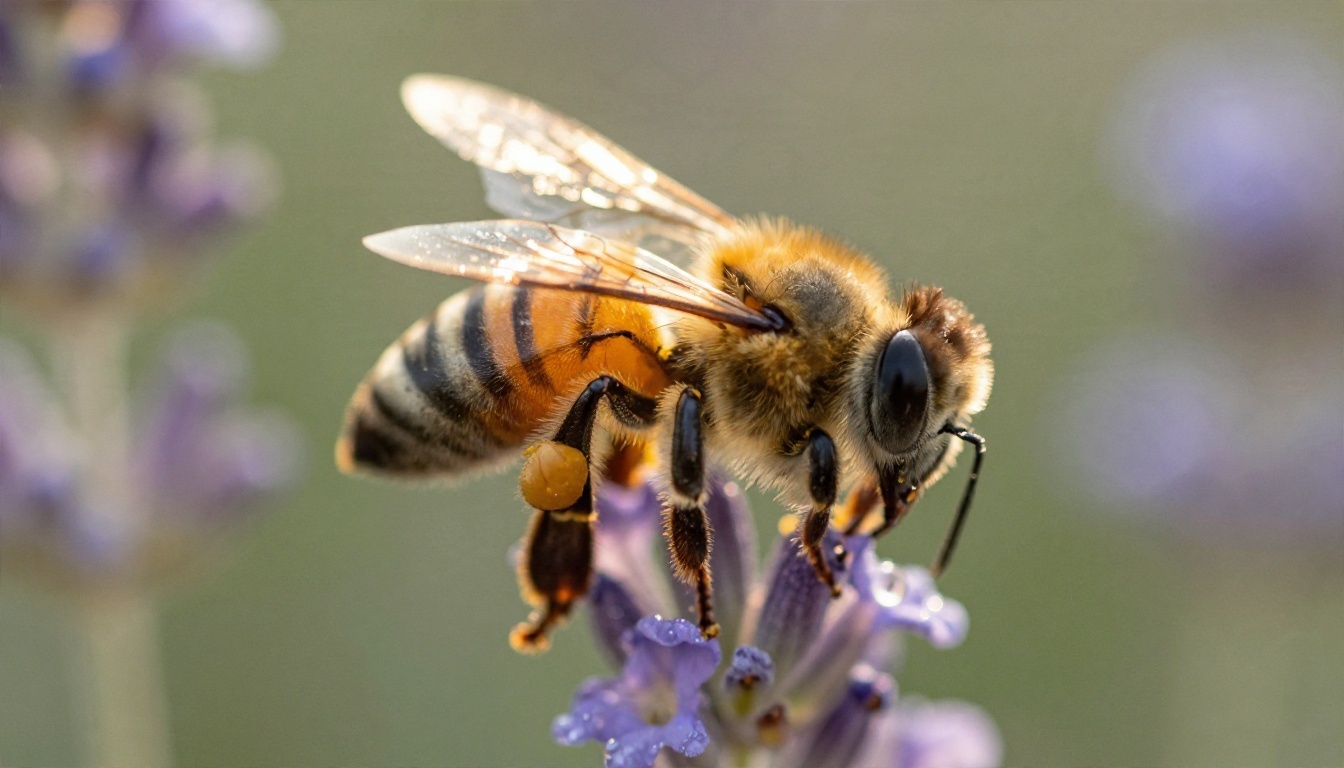
Prompt to paste:
Extreme macro photograph of a honeybee landing on a lavender flower, pollen dusting its fuzzy thorax, translucent wing veins catching backlight, soft green meadow melting into creamy bokeh, early morning dew droplets on petals, 100mm macro f/4 lens, sharp compound eye detail, warm sunlight from behind left, natural film grain.
Video Prompts That Work
Video prompts follow the same logic with one extra ingredient: time. An image prompt describes a single frame. A video prompt describes what changes over a few seconds. If you forget to say what moves, you get a slow, drifting nothing.
Name the Camera Move
Camera language is the single biggest lever in video. Use plain, standard terms.
| Camera term | What it does | Best for |
|---|
| Slow dolly in | Camera glides toward the subject | Portraits, product reveals |
| Gentle pan left or right | Camera swivels across the scene | Landscapes, interiors |
| Tracking shot | Camera moves alongside the subject | Walking, riding, running |
| Orbit | Camera circles the subject | Objects, dancers, vehicles |
| Static locked off | No camera motion at all | Calm scenes, subtle motion |
| Low angle rise | Camera tilts up from the ground | Hero moments, tall subjects |
Pick one move per clip. Asking for a dolly in, a pan and an orbit at once produces a jittery mess.
A Motion Prompt Example
Here is a reference frame and the prompt that would bring it to life.
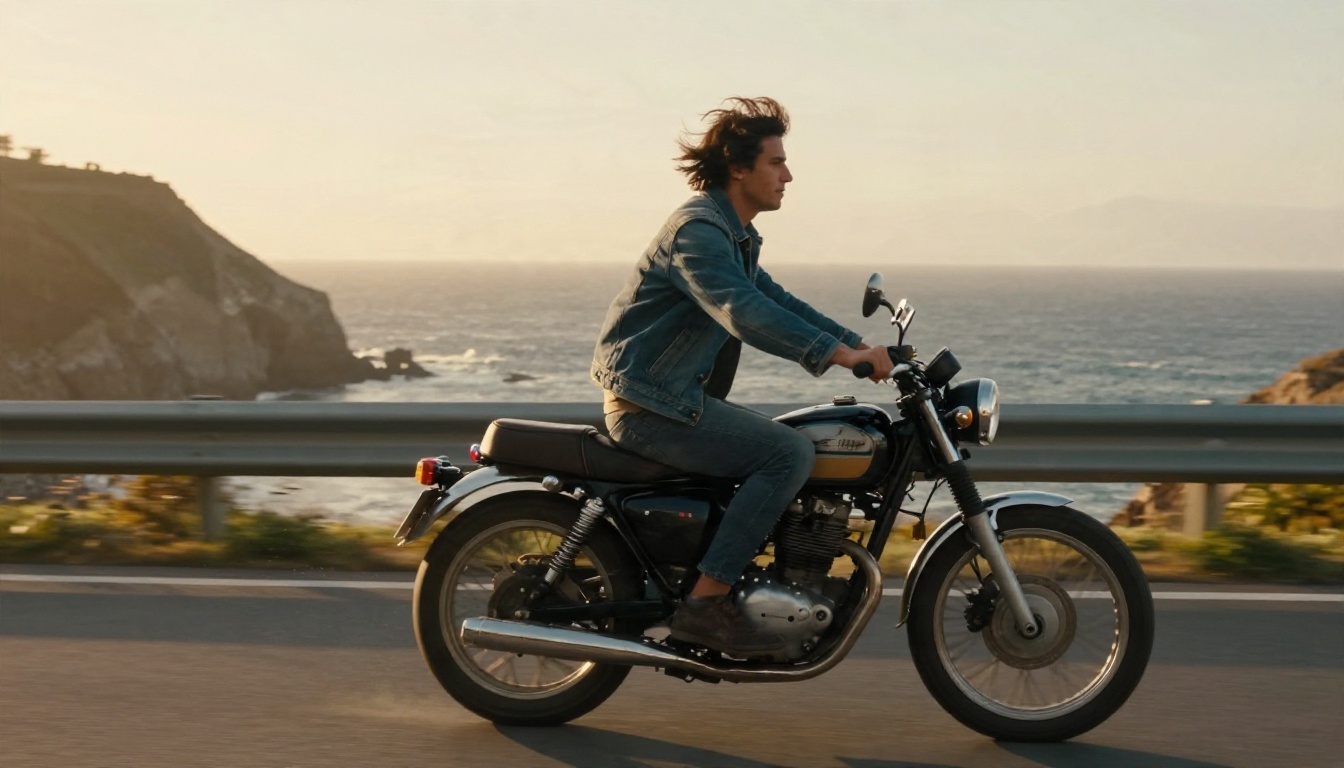
Video prompt to paste:
A young man in a denim jacket rides a vintage motorcycle along a coastal road at sunset. His jacket and hair ripple in the wind as the bike moves steadily forward. The camera tracks alongside at handlebar height, holding him sharp while the cliffs and guardrail streak past in soft motion blur. Warm golden light from the side, dust drifting in the air, the low rumble of the engine and wind in the background.
Read it in order: subject, motion, camera, light, sound. That chronological structure helps the model plan the five seconds instead of guessing.
Add Sound On Purpose
Newer Seedance models generate audio alongside the picture, so your prompt can describe it. A line like "the low rumble of the engine and wind" or "soft rain on a window, distant thunder" shapes the soundtrack the same way a lighting line shapes the image. Leave it out and you get whatever the model considers default.
💡 Tip: Keep video prompts under about 100 words. Long prompts make the model juggle too many actions, and the clip ends up doing none of them well.
Start From a Strong Still
The most reliable video workflow is image first, video second. Generate a still you love, then animate it with a short motion prompt. You control the composition completely, and the video only has to add movement. On PicassoIA you can do this with Seedance 2.5, Seedance 2.5 Lite or Kling v3 Video.
Common Mistakes to Avoid
After a few hundred prompts, the same errors show up again and again. Here is the short list and the fix for each.
| Mistake | What goes wrong | Better approach |
|---|
| Stacking buzzwords ("ultra, masterpiece, 8K, trending") | Model ignores the filler, subject stays vague | Describe the scene, then add one finish term like film grain |
| No light direction | Flat, shadowless images | State where the light comes from |
| Contradictions ("sunny and moody") | Muddy compromise | Choose one mood per prompt |
| Too many subjects | Fused faces, extra limbs | Limit to one or two clear subjects |
| Vague motion in video ("moving nicely") | Barely any movement | Name the exact action and camera move |
| Asking for readable text | Garbled letters | Keep text to one or two short words, or add it later |
| Changing everything at once | You never learn what helped | Edit one variable per attempt |
Fix One Variable at a Time
When a result is close but not right, resist the urge to rewrite the whole prompt. Change only the light, or only the lens, and run it again. After three or four rounds you will know exactly which phrase controls which effect. This is faster than starting over each time, and it builds instincts you carry to every other model.
Skip the Style Words That Backfire
Words like "hyperreal" and "perfect" often push images toward a plastic look. Real photographs have imperfections: grain, uneven light, a stray hair. Ask for those instead, and the output looks more believable, not less.
How to Use Seedream 4.5 on PicassoIA
Dreamina is tied to ByteDance's own platform and its credit system. If you want the same Seedream image quality without that limit, PicassoIA hosts Seedream 4.5, plus Seedream 4 and Seedream 5 Pro. Every prompt in this article works there as written.
Step by Step
- Open the model page. Go to Seedream 4.5 on PicassoIA.
- Paste your prompt. Use one of the examples above, or build your own with the five part formula.
- Pick the aspect ratio. Choose 16:9 for banners and video thumbnails, 1:1 for social posts, 9:16 for stories.
- Generate and review. Look at light direction, skin or surface texture, and whether the subject matches what you asked for.
- Change one variable. Adjust the lens, the light or the time of day, and generate again.
- Animate the best result. Take your favorite still to Seedance 2.5 and add a short motion prompt.
Parameter Tips
| Setting | Recommendation |
|---|
| Aspect ratio | Match the final use before generating, not after |
| Prompt length | 50 to 120 words for photographic scenes |
| Resolution | Start at the default, then upscale only the winners |
| Variations | Run three to four per prompt and pick the best |
Other Models Worth Trying
Different models read prompts a little differently, so it pays to compare. Nano Banana Pro is strong with text in the frame and multi step edits. Flux 2 Klein 9B Base LoRA handles styled looks well. Qwen Image 3 Pro gives clean photographic results from detailed prompts. For editing an existing picture, PicassoIA Image Editor Pro lets you change the light, background or objects without starting over.
For video, Kling v3 Omni Video and Seedance 2.0 Mini are both worth a test with the motion prompt above.
💡 Tip: Run the exact same prompt on two or three models. The differences show you what each one does best, and you will quickly settle on a favorite for each type of subject.
Prompt Ideas to Try Next
Here are six fresh starting points built on the same formula. Paste them, then swap the details.
- A baker pulling a tray of sourdough loaves from a stone oven, flour in the air, warm oven glow on her forearms, 50mm f/2, tight three quarter framing, film grain.
- A rain soaked taxi stand at night, wet asphalt reflecting amber streetlights, a driver reading a newspaper behind fogged glass, 35mm f/1.8, low angle.
- A potter shaping clay on a wheel, wet hands in sharp focus, window light from the left, 85mm f/2.8, ceramic dust on the apron.
- A child chasing soap bubbles in a backyard at late afternoon, backlit hair, 70mm f/2.5, grass blades in the foreground blur.
- A vintage camera on a leather bag beside a train window, countryside sliding past in soft blur, 50mm f/1.4, warm side light.
- A surfer carrying a board across wet sand at sunrise, long shadow, 24mm f/5.6, low angle, salt spray in the air.
For video, add one sentence of motion and one camera term to any of them. "The camera slowly dollies in as steam rises from the loaves" turns the baker into a clip.
Try Your Own Prompts Today
The gap between a forgettable AI image and a striking one is about forty words of specific description. You now have the formula, nine tested examples, a camera move table and a list of mistakes to dodge. The only step left is to run your own.
Open PicassoIA, pick Seedream 4.5 for stills and Seedance 2.5 for motion, and paste the first prompt that matches something you actually need: a product shot, a portrait, a scene for your next post. Change one detail, generate again, and keep what works. If you want to see what else is available, browse everything at picassoia.com/en/all-models and compare how each model reads the same prompt.


