There is something almost absurd about watching a single sentence turn into a 10-second Hollywood-caliber shot. No crew, no equipment rental, no cinematographer arguing about the f-stop. Just a text prompt and Seedance 2.0 doing the rest. ByteDance released this model to considerable fanfare, but what it actually produces goes beyond the hype: fluid motion, cinematic depth, physics-accurate movement, and now, native audio baked directly into every clip. It is the kind of leap that makes the previous generation of text-to-video tools feel like rough drafts.
What Seedance 2.0 Actually Does
Seedance 2.0 is a text-and-image-to-video model built by ByteDance. It takes a written description and returns a video clip with stunning motion fidelity, photorealistic lighting, and synchronized audio. Unlike earlier models that treated sound as an afterthought you would add in post-production, Seedance 2.0 generates audio natively alongside the visual content, treating the two as inseparable parts of the same output.
The results speak for themselves:
- Temporal consistency: Objects, faces, and backgrounds hold together coherently across every frame
- Physics-accurate motion: Water moves like water, cloth folds like cloth, hair reacts to wind with believable inertia
- Native audio synthesis: Ambient sound, movement noise, and environmental audio appear in sync with on-screen action
- Cinematic framing intelligence: The model understands depth of field, camera movement, and compositional language
- Photorealistic rendering: Skin textures, fabric weaves, and surface materials render at a quality that holds up under scrutiny
When you type "a woman in a white dress walks slowly through a wheat field at golden hour," Seedance 2.0 returns something that looks like it belongs in a film production reel, not a novelty AI demo. That consistency is what separates this model from the wave of text-to-video tools that came before it.
The Technology Behind the Scenes
ByteDance built Seedance 2.0 on a foundation of diffusion-based video synthesis combined with a large-scale audio-visual training corpus. The model was trained on millions of high-quality video clips paired with precise text descriptions, giving it a deep understanding of how the physical world moves and sounds. That training data is what allows the model to generalize convincingly to prompts it has never seen before.
What sets this architecture apart from earlier AI video generators is its approach to representing time. Standard image diffusion models work in two spatial dimensions. Video synthesis requires a third, temporal dimension, and most early models handled this by generating frames independently and stitching them together. The results were coherent on a single frame but fell apart across the clip, producing the ghosting and morphing that made early AI video look alien.
How Motion Gets This Good
Seedance 2.0 addresses temporal coherence through a hybrid architecture that processes spatial and temporal information simultaneously rather than in separate passes. The model does not generate frame one, then frame two. It models the entire clip as a unified spatiotemporal structure, which is why objects maintain their identity and physics across time.
Camera motion is handled with particular sophistication. Specify a dolly push in your prompt and the parallax between foreground and background objects shifts exactly as it would on a real set with a physical dolly on rails. Ask for a slow pan across a city skyline and the lighting on buildings transitions naturally as the virtual lens sweeps through space. This is not a simple zoom or crop. The model generates genuine perspective shifts with accurate depth relationships.
Pro tip: Use cinematic camera language in your prompts. Phrases like "low-angle tracking shot," "overhead drone perspective," or "slow push-in on subject" activate behaviors the model learned from actual film and television production footage.
Native Audio That Fits the Frame
This is the feature that separates Seedance 2.0 from virtually everything else at the top of the current text-to-video rankings. The model does not generate silent video and attach audio separately in a post-processing step. It synthesizes both in a unified generative process where the visual and audio signals inform each other.
What this means in practice:
- A crowd scene includes ambient noise, overlapping chatter, and the sound of movement
- A coastal cliff shot produces wind and surf that match the visual intensity of the waves
- A busy kitchen scene carries sizzling, clattering cookware, and background restaurant hum
- A quiet forest scene generates subtle birdsong and the soft rustle of leaves in wind
The audio is not always broadcast-perfect, but it is remarkably contextually appropriate. For content creators who need a complete rough cut quickly, this eliminates an entire production step that used to require separate tools and a sound design pass.
Seedance 2.0 vs. The Competition
The text-to-video space has never been more competitive. Several models are pushing the boundaries of cinematic AI generation simultaneously. Here is an honest comparison of where Seedance 2.0 stands:
The table makes the trade-offs clear. Veo 3 by Google edges out Seedance 2.0 in raw visual quality on complex scenes, but it runs significantly slower and comes with a higher cost per generation. Sora 2 from OpenAI produces exceptional footage but lacks native audio and requires substantial prompting skill to reach its ceiling.
Kling v3 is Seedance 2.0's closest competitor in terms of motion quality, and on some types of scenes, particularly human subjects and dramatic close-ups, it produces results that are indistinguishable. But the absence of native audio is a real limitation for creators who want a complete clip without additional production work.
Seedance 2.0 hits a practical sweet spot. Cinematic quality, native audio, accessible speed, and a cost point that makes iteration realistic. For most creators, this balance matters more than marginal quality gains from a system that costs twice as much and takes three times as long.

How to Use Seedance 2.0 on PicassoIA
Seedance 2.0 is available directly on PicassoIA with zero local setup. No GPU required, no Python environment, no API keys to manage. You open a browser tab, write a prompt, and generate. Everything runs on PicassoIA's infrastructure.
Step 1: Write Your Prompt
The quality gap between a weak prompt and a strong one is enormous with Seedance 2.0. The model has the capability to produce cinematic footage, but it needs clear instructions to deploy that capability in the right direction. Strong prompts include all of these elements:
- Subject: Who or what occupies the frame, with physical specificity
- Action: What is happening, written in active present-tense verbs
- Environment: Where the scene takes place, with three to four concrete details
- Lighting: Time of day, source direction, quality (hard vs. soft), and mood
- Camera: Shot type, angle, and movement direction
Weak prompt: "A woman on a beach"
Strong prompt: "A woman in a flowing red dress stands ankle-deep in ocean surf at dawn, warm pink light painting long shadows behind her on wet sand, camera drifting slowly left in a smooth lateral tracking shot, waves catching the sunrise light as they wash past her feet"
The difference in output is not incremental. It is categorical.
Step 2: Set Your Parameters
On PicassoIA, you control duration, resolution, and motion intensity. For cinematic-quality results:
- Duration: 5 to 10 seconds produces the best single-shot quality. Longer clips can introduce coherence drift
- Resolution: Use the highest available setting for any content you intend to publish
- Motion intensity: Medium settings preserve fine detail while delivering meaningful, believable movement
Tip: Lower motion intensity for static conversational scenes or intimate close-ups. Higher intensity works well for action sequences, natural environments like oceans and forests, and any scene with explicit movement in the prompt.
Step 3: Review and Iterate
Your first generation is almost never your best. Seedance 2.0 produces meaningfully different results on each run due to the stochastic nature of diffusion sampling. A standard workflow looks like this:
- If motion feels too static, add explicit movement instructions to the prompt
- If audio feels disconnected from the visual, describe soundscape elements directly in your prompt text ("the roar of breaking surf," "distant rolling thunder," "a busy kitchen at lunch service")
- If color grading looks flat or oversaturated, anchor your lighting description to a specific time of day and source angle
Use Seedance 2.0 Fast for rapid iteration cycles when you are still refining your prompt, then switch to the full model for your final production render.

What Kinds of Videos Can You Make
The question people usually ask is "what are its limits?" But after spending real time with Seedance 2.0, the more interesting question becomes "what does it make easy that used to require a full production budget?"
Cinematic Short Films
Seedance 2.0 handles narrative footage with genuine conviction. Scenes that would require a full crew, location permits, and a half-day of setup are now a prompt away. A detective walking through rain-soaked city streets at midnight. A couple sharing a quiet moment on a sun-drenched balcony. A lone figure surveying a vast mountain range at dawn. An action sequence in a burning building hallway. The model handles these setups with the kind of spatial and temporal intelligence that used to require human cinematographers making decisions on set.
For short-form content creators, this opens up visual storytelling at a scale that was financially impossible before.
Product Videos and Ads
Commercial content is one of the highest-value applications for AI video generation. A running shoe submerged in water with dramatic underlighting. A perfume bottle on a marble surface with soft morning sun raking across its facets. A mechanical watch on a wrist during a confident handshake in a boardroom. These are exactly the shot types that advertising agencies spend thousands of dollars per hour capturing on physical sets.
Seedance 2.0 makes these shots accessible to independent brands and solo creators. Combined with Seedance 1.5 Pro for image-conditioned workflows, you can take an existing product photo and animate it into a complete commercial clip with motion, depth, and ambient sound.
Social Content at Scale
Short-form platforms operate on volume. A creator who posts consistently needs dozens of original clips per week to maintain reach. Seedance 2.0 makes this volume sustainable. Write ten prompt variations in a morning session, generate them in parallel, review and select by afternoon. The native audio output means clips are often ready to post without a separate sound design pass.
This changes the economics of content creation in a meaningful way. Quality that previously required a two-person production team is now achievable by a single creator with a laptop.

Prompt Writing That Actually Works
There is a craft to writing prompts for video models that differs from writing prompts for image generators. Video requires you to think in time as well as space. A still image can be described by what it contains. A video must also describe what changes, how it changes, and at what rate.
These principles consistently produce better results with Seedance 2.0:
Describe motion explicitly. Do not assume the model will animate a scene. State what moves. "The camera slowly pushes forward." "Her hair blows in the coastal wind." "Smoke curls upward from a chimney in slow spirals." Without motion instructions, the model defaults to minimal movement, which can produce clips that feel frozen.
Anchor your lighting. Generic lighting language produces inconsistent results. "Dramatic lighting" means nothing specific to the model. "A single key light from above-left casting a triangle shadow on her cheek, deep shadow on the right side of the face" tells the model exactly what to produce and activates its cinematic training.
Use film production vocabulary. Words like "rack focus," "bokeh," "anamorphic lens flare," "motion blur on fast movement," and "shallow depth of field" are recognized and activated by the model's training on actual cinematography. This language communicates intent more efficiently than plain description.
Control environment complexity. Busy scenes with many simultaneous elements produce more temporal artifacts. For cleanest results, limit your environment description to three or four specific details and allow the model to fill supporting elements. The model handles sparse, precise descriptions better than exhaustive, dense ones.
Avoid this mistake: Writing a 200-word prompt packed with every detail you can imagine. After a certain density, prompts produce confusion rather than precision. Aim for 60 to 80 words with surgical specificity on the elements that matter most.
PicassoIA Models Worth Pairing
Seedance 2.0 reaches its full potential when used as part of a multi-step workflow rather than in isolation. PicassoIA hosts all the models you need to build production-grade pipelines around it.
Image-to-Video Pipeline: Generate a photorealistic still image using any of PicassoIA's text-to-image models, then feed it into Seedance 2.0 or Seedance 1.5 Pro as a conditioning frame for image-to-video generation. This gives you precise visual control before committing to animation, solving one of the core problems with pure text-to-video workflows where the model interprets ambiguous descriptions differently each run.
Generate then Enhance: Run your clip through PicassoIA's AI video enhancement tools after generation to upscale resolution and stabilize any minor motion artifacts that appear in demanding scenes. The result holds up on larger screens without the visual quality degradation that comes from resizing raw AI video output.
Rapid Prototype then Polish: Use Seedance 2.0 Fast to generate fifteen prompt variations in the time a single full-model run takes. Identify the two or three prompts that are producing the right visual direction, then run those through the standard Seedance 2.0 for maximum output quality on your final assets.
For creators working on complex projects, PicassoIA also offers Kling v3 Omni Video and LTX-2.3 Pro as alternative generation engines worth testing when Seedance 2.0's default aesthetic does not fit the specific project requirements.
Where AI Video Is Right Now
Seedance 2.0 arrives at a precise inflection point. Twelve months ago, text-to-video meant 3-second clips with visible flickering, morphing faces, and an aesthetic that announced itself as artificial from the first frame. Today, it means 10-second photorealistic scenes with synchronized audio that hold up under real scrutiny on a full-size screen.
The models competing at the top of this space, Kling v3, Veo 3, Sora 2 Pro, and Seedance 2.0, are not toys for casual experimentation. They are production-capable tools that belong in the workflow of anyone who creates visual content professionally or semi-professionally.
What ByteDance got specifically right with Seedance 2.0 is the integration of native audio as a first-class output rather than a feature bolted on after the fact. That decision, combined with the model's cinematic motion quality and accessible cost point, makes it the most practical high-quality text-to-video option for the widest range of creators working today.
The gap between AI-generated video and professionally shot footage is closing faster than anyone predicted. The professionals who are building their workflows around these tools now, before the mainstream catches up, will be positioned very differently from those who wait.
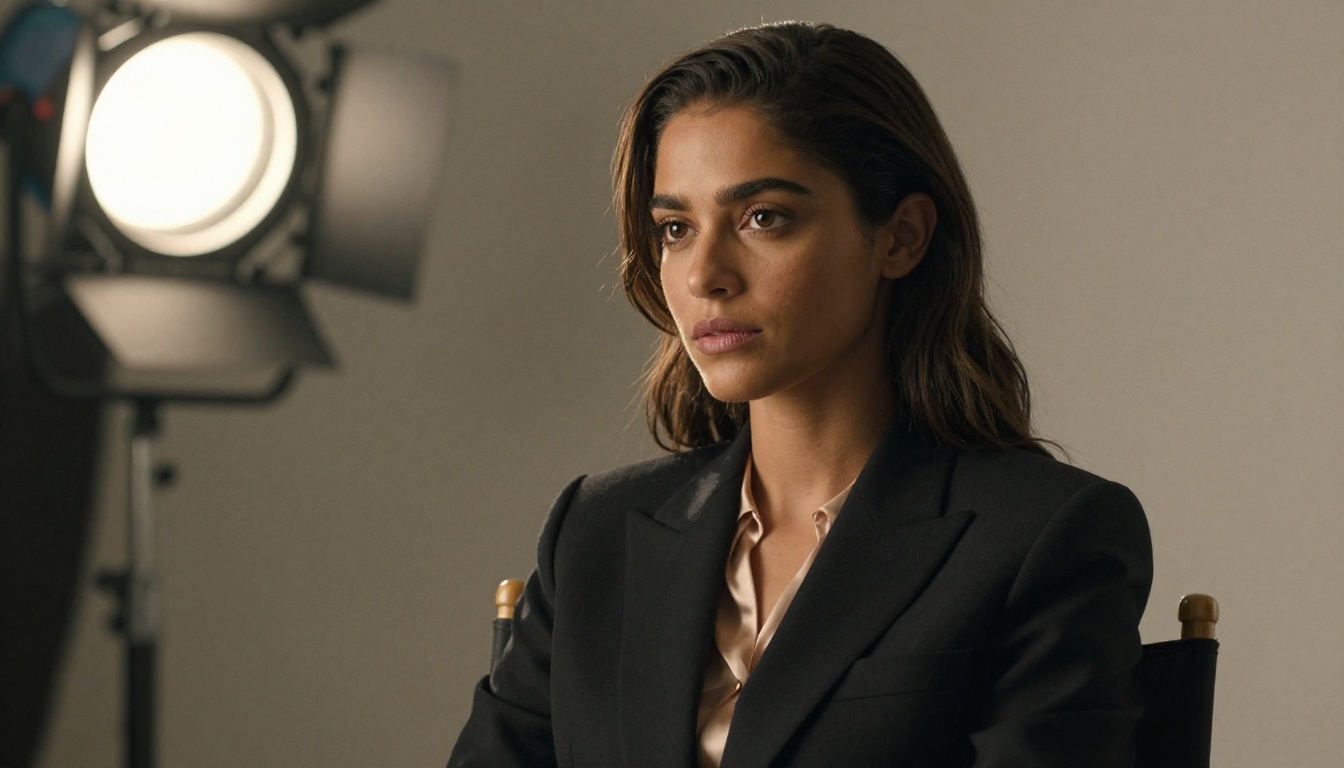
Start Creating Now
If you have been waiting for text-to-video AI to be good enough for real work, that moment arrived with Seedance 2.0. It removes every technical barrier that used to stand between a creative idea and a finished video clip.
No production crew. No equipment rental. No server with a GPU sitting in your office. No complex software pipeline to maintain. You need a clear description of what you want to see, the time to iterate through a few variations, and access to PicassoIA, which handles every generation on its infrastructure.
The best way to build an accurate sense of what Seedance 2.0 can produce is to run it on something specific to your creative work. Take a visual concept you have been holding in your head and write it out as a scene description using the prompt structure from this article. Subject, action, environment, lighting, camera. See what comes back.
Most people are genuinely surprised the first time. Not because AI video is surprising in the abstract anymore, but because Seedance 2.0 specifically produces a quality of cinematic footage that crosses a threshold from "impressive for an AI tool" to "footage I would use in a real project."
PicassoIA gives you access to Seedance 2.0 alongside Kling v3, Veo 3, Seedance 2.0 Fast, and over 80 other text-to-video models in one place. Spin up your first generation today and see for yourself what Hollywood-quality output looks like when it comes from a text box.