There's a moment when you stare at an AI-generated image and can't figure out if it came from a camera or a neural network. Seedream 5.0 is making that moment happen a lot more often. ByteDance's latest text-to-image model doesn't just produce visually impressive outputs, it produces images that pass the credibility test that most AI art has historically failed: the one where you show it to someone who doesn't know it's AI, and they don't ask.
What Seedream 5.0 Actually Does
Seedream 5.0 is a high-fidelity text-to-image diffusion model developed by ByteDance. It builds on the earlier Seedream 4.5 and Seedream 4 architectures, pushing the boundaries of photorealistic image synthesis in ways that earlier versions simply could not reach. The model represents a fundamental rethink of how diffusion systems handle organic surfaces, natural lighting, and biological micro-detail.
How It Differs from Previous Versions
Every version of the Seedream model has improved output quality, but the jump from Seedream 4.5 to 5.0 is the most significant yet. Here is what actually changed:
| Feature | Seedream 4.5 | Seedream 5.0 |
|---|
| Skin texture rendering | Good | Near-photographic |
| Hair strand simulation | Approximate | Individual strand precision |
| Subsurface scattering | Basic | Biologically accurate |
| Environmental light | Consistent | Dynamic and directional |
| Film grain and noise | Optional | Organic and authentic |
| Prompt text adherence | High | Very High |
The architectural changes include improved cross-attention mechanisms for better prompt adherence, a refined denoising pipeline that preserves micro-detail during synthesis, and a new lighting model that simulates how photons actually behave when they hit surfaces.
The Realism Threshold Nobody Talks About
Most AI image quality discussions focus on resolution. But resolution isn't what makes a photo look real. What makes a photo look real is imperfection. Pores. Asymmetry. The way light scatters differently through thin skin versus thick skin. The tiny wrinkle at the corner of an eye when someone is smiling but not laughing. Seedream 5.0 was trained specifically to reproduce these irregularities, because the training data was curated around documentary and photojournalistic photography rather than idealized studio work.
💡 The real test: Show a Seedream 5.0 portrait to someone and ask "does this person look real?" The answer, almost universally, is yes. Previous models failed this test at the detail level.
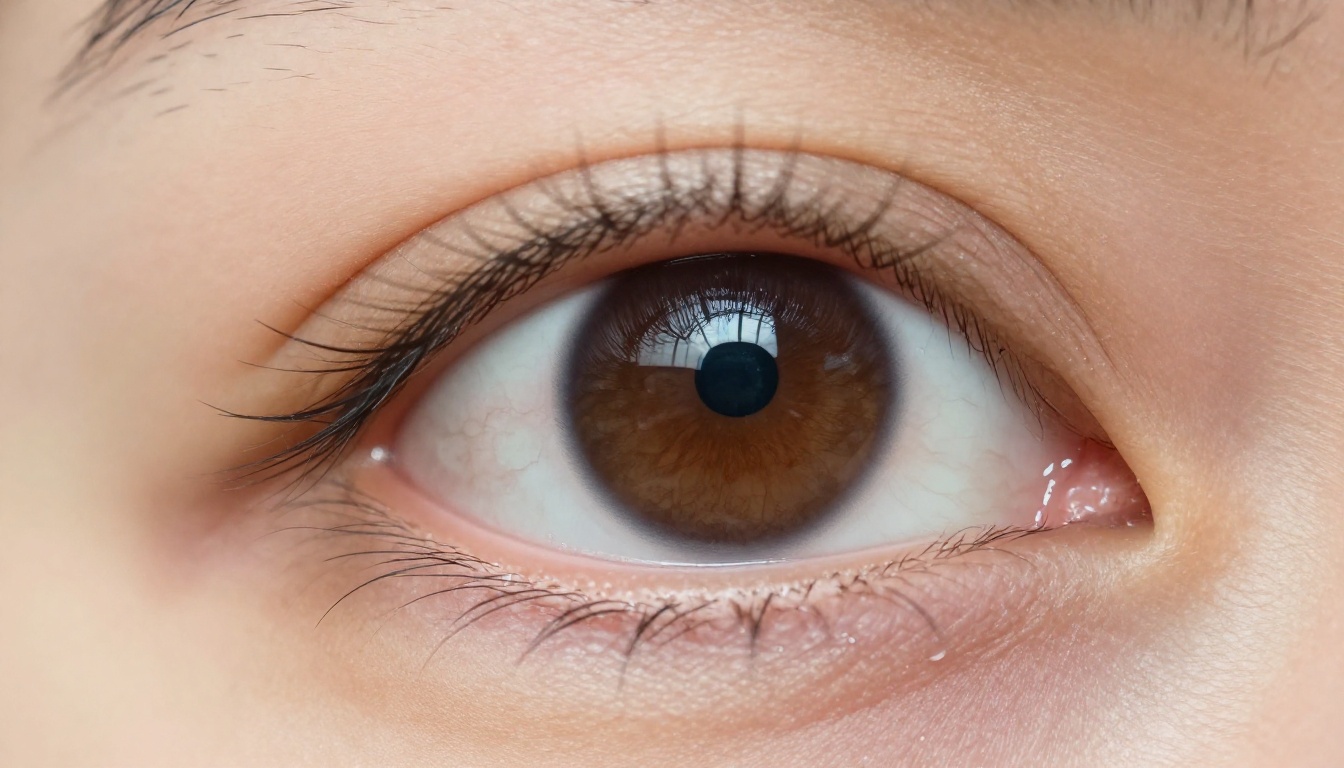
Why Human Eyes Get Fooled
The human brain is wired to detect faces and organic surfaces. It's also incredibly good at spotting artifacts in AI images: those slightly-too-smooth skin textures, the mathematically perfect hair arrangements, the light that seems to come from everywhere and nowhere simultaneously. Seedream 5.0 sidesteps all of these detection mechanisms by modeling the physics of light and biology at a much deeper level than its predecessors.
Skin Texture Rendering
Previous generations of diffusion models averaged skin textures into a kind of smooth approximation. Seedream 5.0 renders subsurface scattering accurately, meaning light doesn't just bounce off skin, it penetrates slightly and diffuses from within, the way light actually behaves on human tissue. The result is skin that looks warm and alive rather than plastic.
You can see the difference in:
- Nose tip and ear lobes: translucent with internal glow in direct sunlight
- Under-eye area: thin skin with faint vascularity visible in close focus
- Forehead: pore-level detail with natural oil reflection and fine texture variation
- Lips: realistic dryness, micro-cracks, and moisture variation across the surface
Light Behavior and Shadows
This is where Seedream 5.0 genuinely shocked the AI image community. The model appears to simulate physically-based rendering of light, including:
- Directional falloff from a single light source, with accurate penumbra at shadow edges
- Bounce light filling shadow areas with subtle warm or cool cast from nearby surfaces
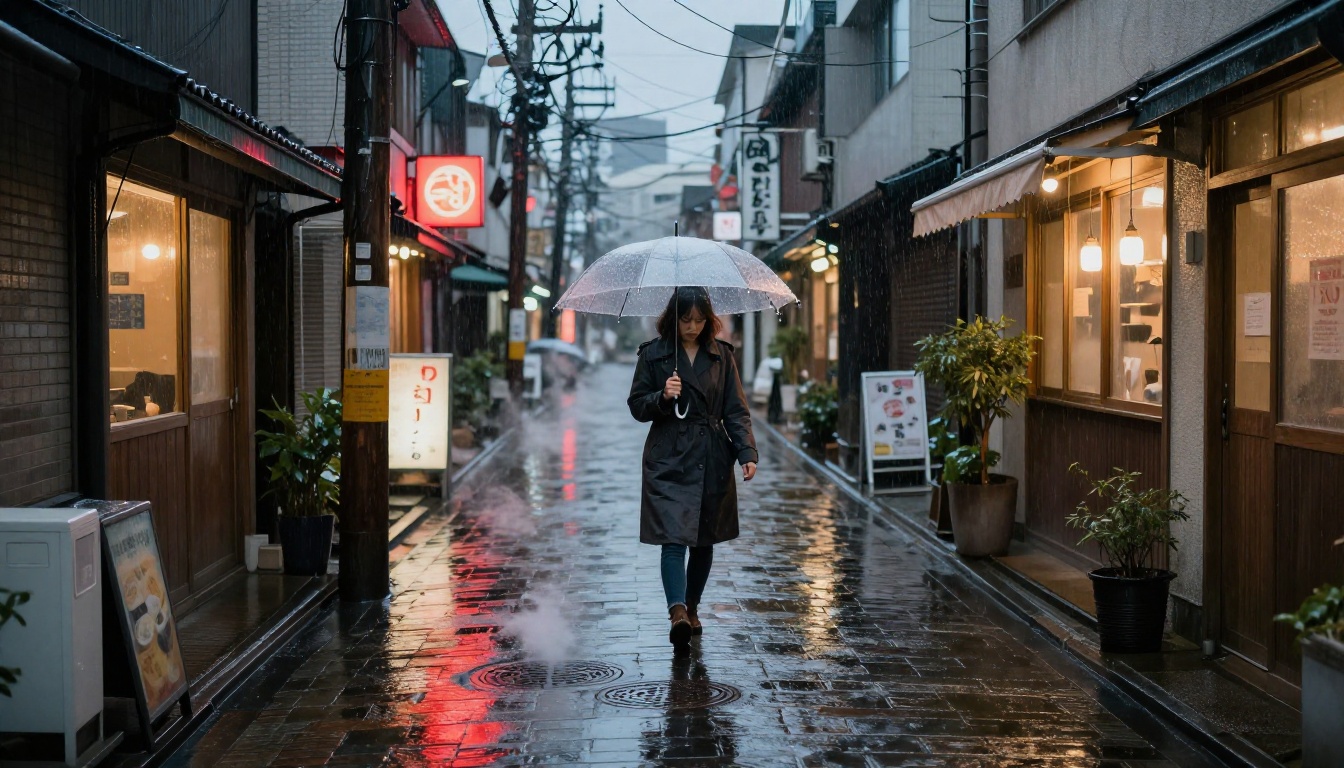
- Specular highlights on wet surfaces that match the implied light direction
- Ambient occlusion in creases, wrinkles, and fabric folds, the natural darkening that occurs where surfaces are close together
These are not post-processing tricks. They emerge from the generation itself because the model has internalized how physical light works.

Depth, Focus, and Film Grain
Real cameras don't capture everything in perfect focus. The way a lens renders out-of-focus areas (bokeh) is one of the strongest visual signals of authentic photography. Seedream 5.0 generates optically accurate depth of field based on the implied lens specification in the prompt. Tell it you're using an 85mm f/1.4 lens and it will render background bokeh that actually matches what that lens produces, including the characteristic circular highlight shapes and edge-softening behavior.
Beyond that, the film grain simulation is organic. It's not a filter applied over the image. The noise structure varies based on tone and subject area, just like actual photographic film responds differently in shadows versus highlights.
Seedream 5.0 vs. the Competition
Seedream 5.0 doesn't exist in a vacuum. The text-to-image space is more competitive than ever, with major players like Flux 2 Pro, GPT Image 1.5, and Imagen 4 all pushing for photorealism from different angles.
Side-by-Side: What the Numbers Show
In independent evaluations from researchers and the AI art community, Seedream 5.0 consistently tops realism scores on portrait and lifestyle photography. Here is how it stacks up across categories:
| Category | Seedream 5.0 | Flux 2 Pro | GPT Image 1.5 | Imagen 4 |
|---|
| Portrait realism | ★★★★★ | ★★★★☆ | ★★★★☆ | ★★★★☆ |
| Landscape fidelity | ★★★★★ | ★★★★★ | ★★★☆☆ | ★★★★★ |
| Product photography | ★★★★☆ | ★★★★★ | ★★★★★ | ★★★★☆ |
| Prompt adherence | ★★★★★ | ★★★★☆ | ★★★★★ | ★★★★☆ |
| Generation speed | ★★★☆☆ | ★★★★☆ | ★★★☆☆ | ★★★★☆ |
Scores are approximations based on community benchmarks and are not official metrics.
Where Other Models Still Fall Short
Flux 2 Pro is exceptional at structural composition and text rendering, but its skin tones still have a slight painterly quality that breaks photorealism at close inspection. GPT Image 1.5 excels at following complex instructions and editing tasks but sometimes produces an overly processed, magazine-retouched look that feels artificial. Imagen 4 is strong on landscapes and nature but struggles with hyper-realistic human faces at the micro-detail level.
Seedream 5.0's advantage is specifically in the organic, biological realism of portraits and lifestyle scenes, the category where AI has historically been most recognizable as AI.
💡 Tip: For pure photographic realism in portraits, Seedream 5.0 is the current top pick. For heavily text-integrated designs, pair it with Flux 2 Max for hybrid workflows.
The Hidden Details That Make It Work
The high-level capabilities are impressive. But the real story is in the micro-details that Seedream 5.0 gets right without being explicitly told to. This is what separates a model that has truly internalized photographic reality from one that is merely approximating it.

Hair Strand Simulation
Human hair is one of the hardest things for AI to render convincingly. Each strand has a different diameter, color, and curvature. Clumps form naturally. Flyaways catch backlight differently than the main body of hair. Seedream 5.0 handles all of this without specific prompting. Ask for a portrait with "natural hair" and you'll get individual strand-level precision, complete with realistic root-to-tip color variation and accurate light refraction through each filament.
This extends to other fine structures: animal fur, grass blades, fabric thread count, individual pine needles on a tree branch. The model treats all of these as physically real structures, not visual textures.
Environmental Realism
A portrait doesn't exist in a vacuum. The environment around a subject affects how they're lit, what colors bounce onto their face, and what atmospheric effects are present. Seedream 5.0 treats the environment and the subject as part of the same physical system:
- A person standing near a window gets a color cast from the sky outside
- A subject in a forest gets dappled light through leaves, not uniform lighting
- A face in a crowd scene gets correct occlusion shadows from surrounding people
- Wet surfaces get accurate reflections of the environment, not generic shimmer
This environmental coherence is what makes Seedream 5.0 outputs feel like pulled-from-life photographs rather than generated compositions.
Fabric and Surface Textures
The realism extends well beyond portraits. Seedream 5.0's material rendering is exceptional across a wide range of surfaces:
- Silk: correct specular sheen with directional highlights that shift with viewing angle
- Linen and cotton: visible weave structure with natural wrinkle behavior and shadow in the folds
- Leather: pore texture, scuff marks, and specular variation across different surface areas
- Stone and concrete: micro-surface detail with authentic weathering and moisture variation

How to Use Seedream 5 Lite on PicassoIA
Seedream 5 Lite is the accessible version of the Seedream 5.0 architecture, available directly on PicassoIA. It delivers the core photorealism of Seedream 5.0 with faster generation times, making it practical for high-volume creative work. Here is how to get the best results.

Step 1: Build Your Prompt in Layers
The biggest mistake with Seedream 5 Lite is being too vague. The model responds to specificity. Build your prompt in layers:
- Subject: Who or what is in the image? Be specific. "A woman in her late 30s with short dark hair and natural freckles" beats "a woman."
- Environment: Where are they? "In a narrow Kyoto alley at dusk with wet cobblestones" beats "outside."
- Lighting: Be exact. "Warm golden hour backlight from the right, soft fill light from the left casting subtle shadow on the nose bridge" beats "good lighting."
- Camera: Specify a lens. "Shot on a 50mm f/1.4 lens, shallow depth of field, subject in sharp focus" tells the model exactly what bokeh structure to render.
- Film and Texture: "Kodak Portra 400 grain, RAW photography aesthetic, no post-processing appearance" pushes it firmly toward organic photographic texture.
💡 Pro tip: Add "visible skin pores, natural asymmetry, no makeup look" to portrait prompts for maximum realism. The model responds strongly to requests for imperfection, which is exactly what makes the output look human.
Step 2: Use the Right Settings
When working with Seedream 5 Lite on PicassoIA:
- Aspect Ratio: Use 16:9 for landscape and environmental shots, 3:4 for portraits
- Resolution: Always choose the highest available resolution to preserve micro-detail
- Steps: More steps produce cleaner detail in hair, skin pores, and fabric weave
- CFG Scale: A lower CFG (4 to 6) produces more photographic, less "AI" results. A higher CFG (7 to 10) produces more stylized outputs with higher contrast
Step 3: Upscale for Print-Quality Results
After generating your base image with Seedream 5 Lite, run it through a Super Resolution model to upscale without losing the micro-detail. The PicassoIA platform offers super-resolution options that can push your output to print-ready quality, preserving all the realistic texture work that Seedream 5.0 outputs are built on.

What You Can Create Right Now
Seedream 5.0's photorealism opens up specific use cases that were impractical with earlier models. The outputs are good enough to use in real creative and commercial contexts.
Portrait Photography
This is where the model excels most. Headshots, lifestyle portraits, editorial photography, beauty campaigns, all of these work at a level where the AI origin is genuinely difficult to detect. Compared to earlier models like Seedream 3, the jump in portrait quality is dramatic.
For portrait work specifically, Realistic Vision v5.1 is also worth trying alongside Seedream 5 Lite. The two models have different strengths: Seedream 5.0 wins on biological skin micro-detail, while Realistic Vision v5.1 sometimes has a more cinematic overall aesthetic that suits editorial work.

Landscape and Nature
Aerial shots, dramatic natural environments, and golden hour scenes are where Seedream 5.0 produces outputs that compete directly with professional photography. The model's environmental realism means atmospheric effects like mist, dust, and haze render convincingly as part of the physical scene rather than as added filters.
For nature and landscape work at the absolute highest quality, Flux 1.1 Pro Ultra is a strong alternative with a different stylistic approach, particularly for very wide scenes with complex sky and terrain interactions.
Commercial and Product Shots
Seedream 5.0's material rendering makes it highly capable for product photography contexts: food, fashion accessories, surfaces, and still life compositions. The model handles wet surfaces, translucent materials, and reflective objects with genuine physical accuracy, which is exactly what commercial photography requires.
💡 Workflow idea: Generate product shots with Seedream 5 Lite, then use PicassoIA's image editing tools for inpainting adjustments to fine-tune specific areas without regenerating from scratch. This hybrid approach produces commercial-quality results in far less time.

Start Creating Photorealistic Images Today
Seedream 5.0 represents a genuine inflection point in AI image generation. The gap between AI output and real photography, which has been the defining limitation of the technology since the field began, is now narrow enough that it disappears entirely in the right hands with the right prompts.
The models are available. The tools are accessible. The only remaining variable is the quality of your creative direction.
PicassoIA gives you direct access to Seedream 5 Lite alongside more than 90 other text-to-image models, including Flux 2 Dev, Ideogram v3 Quality, Imagen 4 Ultra, and many more. Every model is available through the same interface, so you can test, compare, and iterate without switching tools or managing API keys.
Write a detailed prompt. Pick Seedream 5 Lite. See if anyone can tell the difference.
The answer might surprise you.


